CPython ships its own specialised memory manager called pymalloc, which sits between the Python interpreter and the C-level malloc(). Pymalloc organises memory into a three-level hierarchy: Arena, Pool and Block
Table of Contents
Introduction
Every time you create a small Python object — an integer, a short string, a tuple, a small dictionary — CPython has to find memory for it, fast. Calling the operating system’s general-purpose malloc() for every single object would be slow. It would fragment memory badly, because Python programs allocate and free enormous numbers of small, short-lived objects.
To solve this, CPython ships its own specialised memory manager called pymalloc, which sits between the Python interpreter and the C-level malloc(). Pymalloc organises memory into a three-level hierarchy:
Arena → Pool → BlockWhy Not Just Use malloc() Directly?
General-purpose allocators like malloc() are built to handle allocations of any size, for any program — a web server, a compiler, a game engine. That flexibility comes at a cost:
- Bookkeeping overhead per allocation. Each malloc() call typically reserves extra bytes for metadata (size, free-list pointers), which is wasteful when your average allocation is 16–64 bytes.
- Fragmentation. Mixing many different sizes over time leaves small, unusable gaps in memory.
- Speed. General allocators aren’t optimised for the specific pattern of “millions of small, same-sized, short-lived objects,” which is exactly Python’s typical workload.
Pymalloc addresses this by handling only small objects (≤ 512 bytes) itself, using a scheme tuned for that size range. Anything larger than 512 bytes is handed off to the system malloc(), since large allocations are rarer and the overhead matters less.
Overview
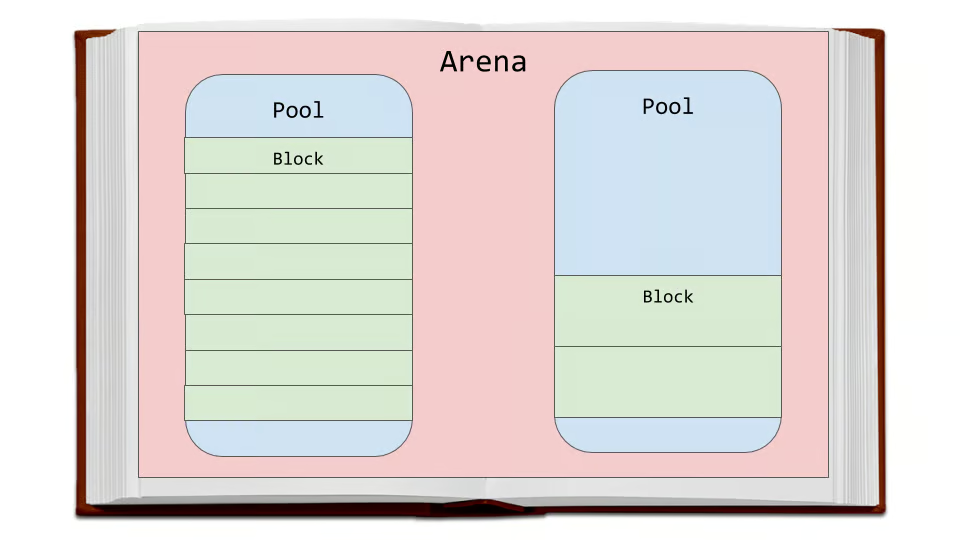
Layer 1: The Block — The Smallest Unit
A block is the smallest unit of memory in pymalloc — a fixed-size slot sized to hold one small object’s data.
Size class
A size class is just a fixed, predefined block size that pymalloc uses to group allocations.
Blocks come in fixed sizes, always a multiple of 8 bytes: 8, 16, 24, 32, 40, … up to 512 bytes. This gives exactly 64 size classes (512 ÷ 8 = 64).
Instead of giving out memory in whatever exact size you ask for, pymalloc rounds your request up to the nearest one of these fixed sizes.
When you request n bytes of memory (n ≤ 512), pymalloc doesn’t give you exactly n bytes — it rounds up to the nearest size class.
Example:
- You ask for 20 bytes → rounded up to the 24-byte size class.
- You ask for 100 bytes → rounded up to the 104-byte size class.
- You ask for 500 bytes → rounded up to the 504-byte size class (or whichever multiple of 8 is next).
Why fixed sizes?
Fixing the block size within a given region means:
- No need to record each block’s size individually — the pool it lives in already knows.
- No fragmentation within a pool. Every freed block leaves a gap that’s exactly one size — the pool’s own size class — so any new request for that same size slots right into the gap with zero leftover space.
Free blocks double as list nodes
A freed block isn’t tracked with a separate bookkeeping structure. Instead, the first few bytes inside the freed block itself store a pointer to the next free block, forming a singly linked free list:
freeblock → [Block 3] → [Block 7] → [Block 12] → NULLThis means allocating or freeing a block is an O(1) pointer operation — pop the head of the list to allocate, push onto the head to free — with zero extra memory spent on bookkeeping.
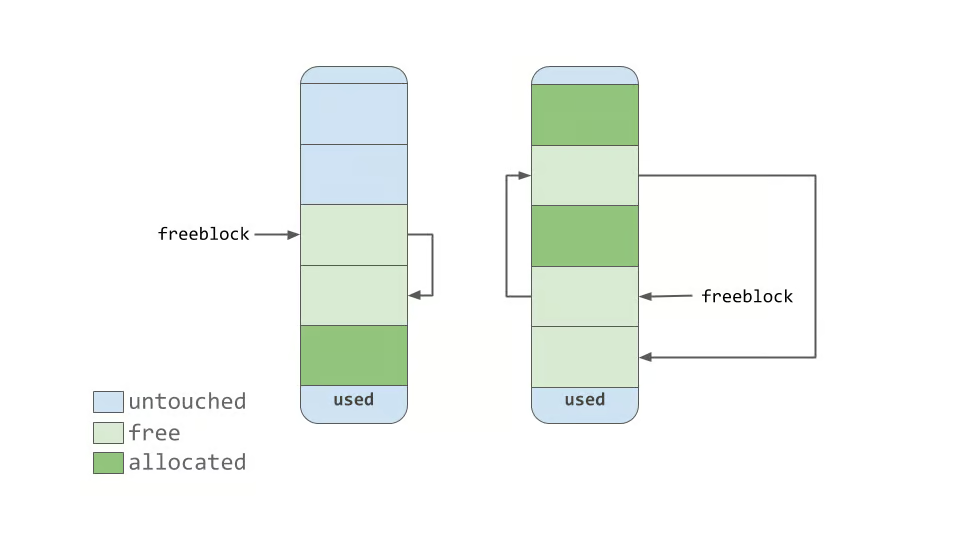
Layer 2: The Pool — Grouping Blocks of One Size
A pool is a 4 KB (4096-byte) chunk of memory, aligned to a 4 KB boundary, dedicated entirely to blocks of one size class at a time.
Each pool is dedicated to serving just one size class. So a “32-byte pool” only ever hands out 32-byte blocks; a “104-byte pool” only ever hands out 104-byte blocks.
Formula
Number of blocks = (Pool size − Header size) / Block size
= (4096 − 48) / Block sizeExamples
| Block size (size class) | Blocks per pool |
|---|---|
| 8 bytes | (4096−48)/8 = 506 blocks |
| 16 bytes | (4096−48)/16 = 253 blocks |
| 32 bytes | (4096−48)/32 ≈ 126 blocks |
| 64 bytes | (4096−48)/64 ≈ 63 blocks |
| 104 bytes | (4096−48)/104 ≈ 38 blocks |
| 256 bytes | (4096−48)/256 ≈ 15 blocks |
| 512 bytes (largest size class) | (4096−48)/512 ≈ 7 blocks |
The pattern: smaller block size → more blocks fit in the pool. Larger block size → fewer blocks fit. Makes sense — you’re dividing the same fixed 4 KB pie into either many small slices or a few big ones.
Structure of a pool
┌─────────────────────────────────────────────┐
│              Pool Header                    │  (~48 bytes)
│  freeblock ptr, nextpool, prevpool,         │
│  arenaindex, szidx, nfree, ref count        │
├─────────────────────────────────────────────┤
│ Block │ Block │ Block │ Block │ ... │ Block │
└─────────────────────────────────────────────┘The pool header tracks:
- szidx — which size class this pool currently serves.
- freeblock — pointer to the head of the free list within this pool.
- nextpool / prevpool — links so pools of the same size class form a doubly linked list.
- A reference back to the arena it belongs to.
Pool states
Every pool is always in exactly one of three states:
- Empty — no blocks have been carved out yet, or every block has been freed. An empty pool can be reassigned to serve a different size class later.
- Used — some blocks are allocated, some are free. This is where new allocations of that size class are served from.
- Full — every block in the pool is currently allocated. Full pools are set aside until something in them is freed.
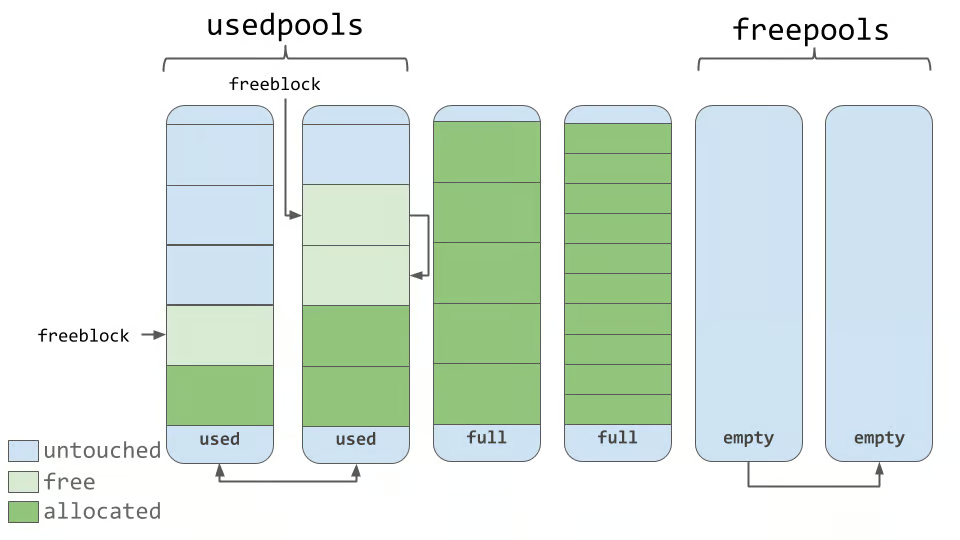
Fast lookup: usedpools[]
CPython keeps an array called usedpools, indexed by size class, pointing to the pool currently being used to satisfy allocations for that size. This means most allocations skip any searching entirely — go straight to the right pool, pop a block off its free list, done.
Capacity example
For a 32-byte size class: (4096 − 48) / 32 ≈ 126 blocks per pool. For the largest size class, 512 bytes: (4096 − 48) / 512 ≈ 7 blocks per pool.
Smaller size classes pack far more blocks into each pool; larger size classes leave more of the pool “spent” on fewer blocks.
Layer 3: The Arena — The Top-Level Memory Region
An arena is a large region of memory — 256 KB in the classic pymalloc design — obtained directly from the operating system via the system allocator (not from pymalloc’s own pools).
Arenas are carved into pools
Each 256 KB arena is divided into exactly:
256 KB / 4 KB per pool = 64 poolsEvery arena — no matter when it’s created, or what size classes its pools end up serving — is always carved into exactly 64 pools. This number is fixed by the arena and pool sizes, not by what’s being allocated.
What does vary is what each of those 64 pools is used for — some might serve the 16-byte size class, others the 32-byte class, others might sit empty on the freepools list. But the count itself, 64 pools per arena, never changes.
Unlike a pool, an arena isn’t locked to one size class — different pools within the same arena can serve different size classes simultaneously. One pool might hold 16-byte blocks while its neighbour in the same arena holds 128-byte blocks.
Arena management
CPython keeps arenas in a structure sorted by how many free pools they have (usable_arenas, a doubly linked list). This ordering is deliberate: by preferring to allocate from arenas that are already mostly full, CPython increases the odds that other, emptier arenas will become empty — and an empty arena can be released back to the operating system entirely.
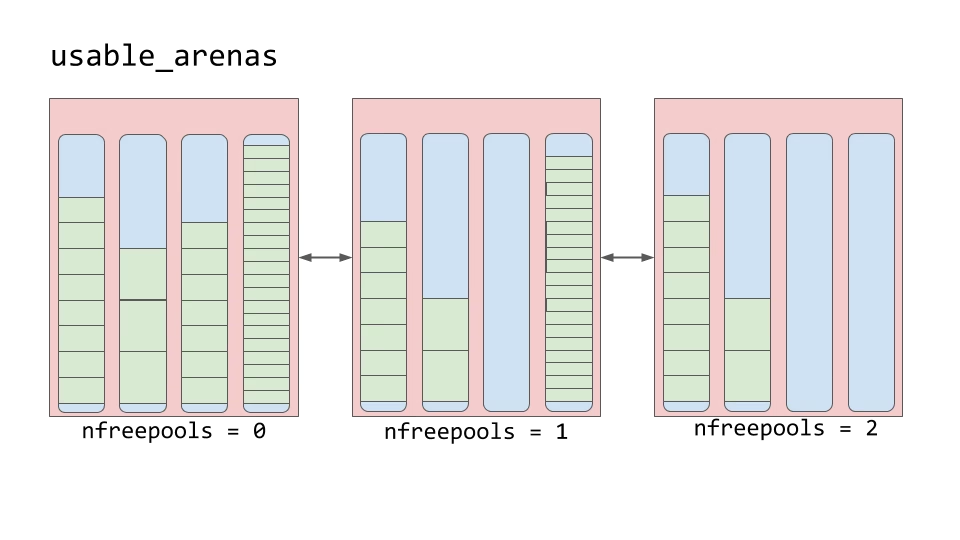
freepools: tracking empty pools within an arena
Each arena struct also carries its own freepools field — a singly linked list of pools within that specific arena that are currently empty and not yet assigned to any size class.
There’s an important distinction between two very different pieces of state:
- A pool’s own freeblock list — the free blocks inside one already-assigned pool (used to satisfy allocations of that pool’s size class).
- An arena’s freepools list — the free pools inside one arena, not yet committed to any size class at all.
When an arena is first carved out of raw OS memory, none of its 64 pools has been touched yet — they all start linked together on that arena’s freepools list, untouched and unassigned.
Arena
 └── freepools → [Pool A] → [Pool B] → [Pool C] → ... → NULL
(empty, unassigned to any size class)The flow looks like this:
- A new size class needs a pool (its own usedpools[] pool is full or doesn’t exist yet).
- CPython checks the current arena’s freepools list.
- If it’s non-empty → pop the head pool off freepools, initialise it for the needed size class, and start carving blocks from it.
- If freepools is empty → this arena has no untouched pools left; CPython either moves to another arena with free pools or requests a brand-new arena from the OS.
The reverse also happens: if every block in a pool gets freed (the pool becomes fully empty), that pool doesn’t just sit there tied to its old size class — it gets unlinked and pushed back onto its arena’s freepools list, ready to be reassigned to any size class the next time one is needed. This is exactly what makes it possible for one arena to simultaneously host pools of many different size classes over its lifetime — pools cycle in and out of freepools as demand for different sizes shifts.
This freepools mechanism is also the missing piece connecting pool-level freeing to arena-level freeing: an arena only becomes eligible for release back to the OS once all 64 of its pools have cycled onto freepools (i.e., none of them is actively serving any size class anymore).
This is the key memory-reclamation mechanism in pymalloc:
Individual blocks and pools are never returned to the OS on their own. Only a whole arena, once every one of its 64 pools is empty, gets freed back to the system.
This is also why long-running Python programs sometimes hold onto more memory than “currently needed” — a single object still alive in an otherwise-empty arena is enough to keep that entire 256 KB region from being released.
Putting It All Together: The Allocation Path
When your Python code creates a small object, roughly this sequence happens:
- Request size n bytes arrives (n ≤ 512).
- Round up to the nearest 8-byte size class → this gives an index into usedpools.
- Check usedpools[index] — is there already a pool serving this size class with a free block available?
- Yes → pop a block off that pool’s free list. Done. (This is the hot path, and it’s extremely fast.)
- No available pool → pull an empty pool off the current arena’s freepools list and initialise it for this size class.
- freepools is empty (arena fully committed) → move to another arena with free pools, or request a fresh 256 KB arena from the OS.
- Requested size > 512 bytes → skip pymalloc entirely; go straight to the system malloc().
Freeing an object reverses this: the block is pushed back onto its pool’s freeblock list. If that makes the pool empty, the pool is unlinked from its size class and pushed onto its arena’s freepools list, ready for reuse by any size class. If every pool in an arena ends up on freepools, the whole arena can be returned to the OS.
Summary Table
| Layer | Size | Contains | Governs |
|---|---|---|---|
| Block | 8–512 bytes (multiples of 8) | Raw object data | Fixed size class |
| Pool | 4 KB | ~7 to ~126 blocks (one size class) | 3 states: empty / used / full |
| Arena | 256 KB | 64 pools (mixed size classes allowed) | Requested from / released to the OS |
Why This Design Matters
- Speed: most allocations resolve in O(1) via free-list pointer operations, with no system call involved.
- Reduced fragmentation: same-size blocks within a pool leave no wasted gaps.
- Controlled OS interaction: the system allocator is only invoked for arena-level (256 KB) requests or for objects above the 512-byte threshold — not for every small object individually.
- Graceful memory return: while individual objects come and go constantly, whole arenas can still be reclaimed once they’re fully vacated, keeping Python’s memory footprint from growing unboundedly.
Understanding this hierarchy also explains some real-world behaviours: why sys.getsizeof() on a small object doesn’t map cleanly to actual memory used (rounding to size class), why memory usage sometimes plateaus rather than shrinking immediately after deleting many objects (arenas held open by a few surviving objects), and why CPython performs so well on workloads dominated by many small, short-lived objects.

1 thought on “Inside CPython’s Memory Allocator: Arenas, Pools, and Blocks”