
Apache Kafka has become the backbone of modern real-time data pipelines and event-driven architectures. Originally developed at LinkedIn and later open-sourced, Kafka is now one of the most widely adopted distributed streaming platforms. It is designed to handle high-throughput, fault-tolerant, and scalable event streaming across diverse industries.
Table of Contents
What is Kafka?
At its core, Kafka is a distributed publish-subscribe messaging system built for high performance and fault tolerance. Unlike traditional message brokers, Kafka is optimised for:
- Event streaming: continuous flow of records (events) between systems.
- Scalability: handle millions of events per second.
- Durability: persistent storage with replication.
- Decoupling: producers and consumers are independent.
In simple terms, Kafka allows applications to publish (write), subscribe (read), store, and process events in real time.
Why Kafka Exists: The Need for a Distributed Streaming Platform
Why can’t two systems talk directly to each other instead of using something like Kafka (or any message broker/queue) in the middle?
Speed mismatch
Multiple systems can’t process at the same speed.
- Direct: System 1 will overwhelm System 2 during a spike.
- Kafka: messages pile in Kafka, System 2 consumes at its own pace.
Scenario: System 1 → System 2
- System 1 produces messages at speed S1 (messages per second).
- System 2 consumes messages at speed S2.
Now, if S1 != S2, problems arise:
- If S1 > S2 (producer faster than consumer)
- Direct communication: System 2 will be overwhelmed → it may crash, drop messages, or slow down.
- With Kafka: messages are queued in Kafka → System 2 consumes at its own pace.
- If S1 < S2 (producer slower than consumer)
- Direct communication: System 2 will be idle waiting for data → wasted resources.
| Scenario | Do you need Kafka? | Why |
|---|---|---|
| S1 > S2 (producer faster than consumer) | Yes | Kafka acts as a buffer so messages aren’t lost and the consumer can process at its own pace. |
| S1 < S2 (producer slower than consumer) | No | The consumer will be idle waiting for messages; Kafka doesn’t provide any real benefit here. |
Note:
Even when S1 < S2 (producer slower than consumer), Kafka can still be useful for reasons beyond just handling speed mismatch. Let’s see further:
Decoupling Systems
- In traditional architectures, producers (services generating data) might directly call consumers (services processing data). This creates tight coupling:
- If a consumer is down, → producer fails.
- Scaling one service → difficult.
- Kafka decouples them:
- Producers write to Kafka → never wait for consumers.
- Consumers read at their own pace → can scale independently.
- Kafka allows System 1 and System 2 to be independent.
- System 2 doesn’t need to know exactly when System 1 produces messages.
- Makes development, deployment, and scaling much easier.
- System 2 can be updated or restarted without affecting System 1.
- Without Kafka, direct integration would require careful coordination every time.
Reliability & Durability
Direct calls(without Kafka) = fire-and-forget (unless you build your own retries, storage, etc.).
Kafka gives you:
- Persistent storage (messages stay even if consumers are down).
- Automatic retries & reprocessing.
- Backpressure handling (the queue can absorb spikes).
Note: RabbitMQ, where messages are often removed once consumed, unless configured for durability.
Multiple Consumers
Scalability & Multiple Consumers
- Direct:
- If A wants to send to B, C, and D, it must call each one.
- Kafka:
- A sends a message once.
- Any number of consumers (B, C, D…) can process it independently.
Audit & Replay
- Direct:
- Once B consumes the data, it’s gone unless A logs it.
- Kafka: messages are kept for a retention period, so:
- You can replay events.
- New consumers can “catch up” to old data.
Fault Tolerance
- Direct: If B is down, A either fails or must store messages somewhere temporarily.
- Kafka acts as a durable buffer between the two.
Scalability
- Kafka is partitioned and distributed:
- A topic can have many partitions.
- Each partition can be handled by different brokers in the cluster.
- This allows high throughput — millions of events per second.
- Consumers can scale horizontally by adding more consumers to a group.
Takeaway
- When S1 > S2: Kafka absorbs the speed difference.
- When S1 < S2: Kafka is still useful if you need multiple consumers, durability, replay, decoupling, or fault tolerance.
Kafka is chosen in complex systems, not just for speed mismatch.
Simple Analogy
Without Kafka:
- It’s like calling someone on the phone. If they’re not there, you’re stuck.
With Kafka:
- It’s like leaving a voicemail. They’ll listen when they’re ready.
Kafka Architecture
Kafka’s architecture is designed for distributed, replicated, and partitioned event streaming.
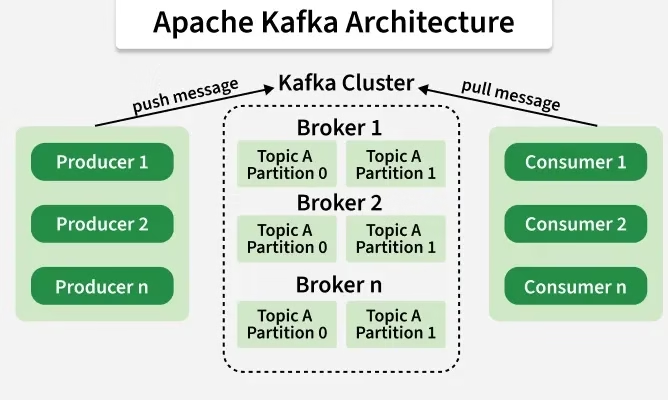
High-level flow:
- The producer sends an event to a topic.
- Kafka broker stores it in the partition log.
- Consumer reads the event at their own pace.
- Kafka ensures events are durable, ordered per partition, and replicated.
Key Features:
- Replication: Each partition is replicated across brokers (default replication factor = 3).
- Leader-Follower model: One broker acts as the leader; others act as followers.
- Exactly-once semantics (EOS): Ensures events are not lost or duplicated (with proper configuration).
To understand Kafka, let’s break down its core components:
Topics
- A topic is a category or feed to which records are published.
- Example: “user-signups”, “payment-transactions”.
- Data is stored in an append-only log.
Partitions
- Topics are divided into partitions for scalability.
- Each partition is an ordered, immutable sequence of records.
- Every record has an offset (a unique ID).
- Example: Topic “orders” with 3 partitions → data is distributed across them.
Producers
- Applications that publish events to Kafka topics.
- Example: An e-commerce site producing “order_placed” events.
Consumers
- Applications that read events from Kafka topics.
- They can be grouped into consumer groups for load balancing.
- Example: Analytics service consuming “order_placed” to track sales.
Brokers
- Kafka servers that store data and serve client requests.
- A Kafka cluster = multiple brokers.
- One broker = thousands of partitions.
Zookeeper / KRaft
- Traditionally, Kafka used Apache Zookeeper for cluster coordination.
- Since Kafka 2.8+, KRaft (Kafka Raft Metadata mode) is replacing Zookeeper for simpler, more scalable management.
Why Kafka? (Advantages)
- Scalability → Linear scaling by adding brokers/partitions.
- Performance → Millions of messages/sec with low latency.
- Durability → Events stored on disk + replicated.
- Decoupling → Producers and consumers evolve independently.
- Flexibility → Works as a message queue, event bus, or streaming system.
Kafka vs Traditional Message Brokers
| Feature | Kafka | Traditional Brokers (e.g., RabbitMQ, ActiveMQ) |
|---|---|---|
| Throughput | Very high (millions/sec) | Moderate |
| Message Retention | Configurable (days, weeks) | Usually deleted once consumed |
| Scalability | Horizontally scalable | Limited scalability |
| Use Cases | Event streaming, analytics | Simple queues, RPC |
Push and Pull Model
Kafka Producer – Push Model
Kafka producers are responsible for sending (pushing) data into Kafka topics. They actively initiate communication with the Kafka brokers — the brokers never request data from them.
How it works:
- Producer prepares data — it creates records (key–value pairs) and decides which Kafka topic to send them to.
- Partition selection — based on the key (or a partitioning strategy), the producer determines which partition of the topic the message should go to.
- Example: same key always goes to the same partition → keeps order.
- Batching and compression — producers batch multiple messages together and optionally compress them to optimise network usage and improve throughput.
- Push to broker — the producer sends (pushes) the batch to the appropriate broker that is the leader for that partition.
- Acknowledgement (acks) — once the broker receives the data, it sends an acknowledgement back to the producer, depending on the configured reliability:
- acks=0 → no acknowledgement (fastest, least safe)
- acks=1 → broker leader confirms receipt
- acks=all → all replicas confirm (safest, slower)
Advantages of Push Model
- High throughput — producers can send data asynchronously in batches.
- Control over durability via acks settings.
- Flexible partitioning logic for scalability.
Limitations
- Producers can overwhelm brokers if not tuned correctly (too fast sending).
- Requires buffering and backpressure management.
Kafka Consumer – Pull Model
Kafka consumers work in the opposite way — they pull (poll) data from brokers instead of being pushed messages.
This means the consumer decides when and how much data to read.
How it works:
- Consumer subscribes to one or more topics.
- It periodically calls the poll() method (or runs a loop internally) to fetch new records from the broker.
- The broker responds with available messages (up to a configurable maximum) that the consumer hasn’t yet read, based on offsets.
- The consumer processes those messages and commits offsets — marking how far it has read.
- Can be an auto-commit or a manual commit, depending on the need.
- The consumer repeats this cycle continuously — polling for new messages as they arrive.
Advantages of the Pull Model
- Consumers control their read speed (avoid being overloaded).
- Easy to handle backpressure and custom batching.
- Multiple consumers can read independently using consumer groups for scaling horizontally.
Limitations
- Slight latency since consumers have to poll periodically.
- More complex error handling if messages fail to process.
In short:
- Producer pushes data into Kafka — it decides when to send.
- Consumer pulls data from Kafka — it decides when to read.
This design lets Kafka act as a high-performance, decoupled buffer between producers and consumers, allowing both sides to operate independently at their own pace.
Common Use Cases
Kafka is a general-purpose event streaming platform with many applications:
- Real-time Analytics: Fraud detection in banking.
- Event-driven Architectures: Microservices communication via Kafka events.
- Log Aggregation: Centralizing logs from multiple applications.
- Data Pipelines: Collecting data from IoT devices and processing in Spark/Flink.
- Message Queuing: Background job processing.
Real-World Example
Order Processing
Imagine an e-commerce platform:
Producers:
- Website sends “order_placed”.
- Payment gateway sends “payment_success”.
Topics:
- orders
- payments
Consumers:
- Analytics service tracks revenue.
- Shipping service prepares delivery.
- Fraud detection monitors anomalies.
This architecture decouples services and allows independent scaling.
Website Clickstream Analytics
- System 1 (Producer): Web app tracking user clicks.
- System 2 (Consumer): Analytics service (e.g., building dashboards, recommendation system).
Usages
- User clicks can spike at peak hours. Kafka buffers all click events so analytics can catch up.
- Even if analytics is down for 10 minutes, no clicks are lost.
Payment Processing System
- System 1: Payment gateway capturing transactions.
- System 2: Fraud detection service.
- System 3: Notification service (sends receipt to customer).
- System 4: Accounting/ledger service.
Usages
- Instead of sending the same transaction data directly to all consumers, Kafka stores it once.
- All consumers read independently, at their own speed.
- If fraud detection is slow, payments and notifications are not blocked.
IoT Devices (Smart Home / Sensors)
- System 1: IoT sensors generating temperature data.
- System 2: Real-time monitoring dashboard.
- System 3: Alerting system (if temperature > threshold).
- System 4: Data warehouse (for long-term analytics).
Sensors may produce data very fast, sometimes faster than consumers. Kafka stores all readings so that different consumers can process them reliably.
E-Commerce Order Management
- System 1: Order service (when a user buys something).
- System 2: Inventory service (reduce stock).
- System 3: Shipping service (create shipment).
- System 4: Recommendation system (update “what others bought”).
Usages
- Order service just publishes one event: OrderPlaced.
- Kafka ensures all services consume it independently.
- Without Kafka, order service would have to call each one directly, making it tightly coupled.
Log Aggregation & Monitoring
- System 1: Multiple microservices writing logs.
- System 2: Monitoring tool (e.g., Prometheus/ELK stack).
- System 3: Security audit system.
Usages
- Instead of each microservice pushing logs directly everywhere, all logs go into Kafka.
- Different tools can consume logs at their own pace.
Real-Time Analytics Dashboard
- Scenario: Track website clicks, app events, or IoT sensor data in real time.
- Kafka Use: Each event is published to a topic like page_views or sensor_data.
- Practice Idea:
- Producer: Simulate random website clicks or IoT sensor readings.
- Consumer: Aggregate data to show live statistics on a dashboard (e.g., top pages, temperature trends).
Log Aggregation System
- Scenario: Collect logs from multiple microservices into one central system.
- Kafka Use: Each service sends logs to a Kafka topic logs.
- Practice Idea:
- Producer: Microservices produce logs with severity (INFO, WARN, ERROR).
- Consumer: Store logs in Elasticsearch or process alerts for ERROR logs.
Chat Application
- Scenario: Real-time chat like WhatsApp or Slack.
- Kafka Use:
- Topic per chatroom or global messages topic.
- Producers send messages; consumers broadcast them to all participants.
- Practice Idea:
- Simulate multiple users sending messages.
- Consumer prints messages to each user’s console or a UI.
Stock Market Data Processing
- Scenario: Stream stock prices or cryptocurrency prices for analysis.
- Kafka Use:
- Producers: Publish stock tickers every second.
- Consumers: Analyse trends, trigger alerts when prices hit thresholds.
- Practice Idea:
- Use random price generation to simulate live trading.
- Build an alert service to notify when prices rise/fall sharply.
Fraud Detection System
- Scenario: Detect suspicious transactions in banking or payments.
- Kafka Use:
- Transaction events are published to the transactions topic.
- Consumers analyse patterns in real-time and flag unusual activity.
- Practice Idea:
- Producer: Random transaction events.
- Consumer: Detect transactions > $10,000 or multiple transactions in a short time.
Social Media Feed
- Scenario: Real-time feed updates like Twitter or Instagram.
- Kafka Use:
- Producers: Publish new posts or updates.
- Consumers: Deliver updates to followers, compute trending topics.
- Practice Idea:
- Simulate multiple users posting.
- Consumer aggregates and prints top trending hashtags.
Kafka Ecosystem
Kafka provides a rich ecosystem around its core:
- Kafka Connect → Integration framework to stream data between Kafka and databases, cloud services, etc.
- Kafka Streams → Lightweight Java library for real-time stream processing.
- ksqlDB → SQL-like interface to process Kafka streams.
- Schema Registry → Manages Avro/Protobuf/JSON schemas for event validation.
Installing & Running Kafka (Quickstart)
We will be using Docker
Step 1: Create a docker-compose.yml
version: '3.8'
services:
  zookeeper:
    image: confluentinc/cp-zookeeper:7.6.0
    environment:
      ZOOKEEPER_CLIENT_PORT: 2181
      ZOOKEEPER_TICK_TIME: 2000

  kafka:
    image: confluentinc/cp-kafka:7.6.0
    ports:
      - "9092:9092"
    environment:
      KAFKA_BROKER_ID: 1
      KAFKA_ZOOKEEPER_CONNECT: zookeeper:2181
      KAFKA_ADVERTISED_LISTENERS: PLAINTEXT://localhost:9092
      KAFKA_OFFSETS_TOPIC_REPLICATION_FACTOR: 1
    depends_on:
- zookeeperStep 2: Start Kafka & Zookeeper
docker-compose up -dCheck if running:
docker ps


You should see at least two containers: one for zookeeper and one for kafka.


CONTAINER ID   IMAGE                           PORTS                          NAMES
cad19d35a74d   confluentinc/cp-kafka:7.6.0     0.0.0.0:9092->9092/tcp         kafka-kafka-1
7616fa289eeb confluentinc/cp-zookeeper:7.6.0 2181/tcp, 2888/tcp, 3888/tcp kafka-zookeeper-1Services
- Zookeeper will run on port 2181
- Kafka will run on port 9092
Step 3: Logic to Kafka console
Way 1: directly open Docker and find out the running Kafka container, use the console
Way 2: Log in to the Kafka console directly in your choice of terminal
docker exec -it <kafka_container_id> bashProduce & Consume Messages
Create a Topic
kafka-topics --create --topic test-topic --bootstrap-server localhost:9092 --partitions 1 --replication-factor 1List the topics
kafka-topics --list --bootstrap-server localhost:9092Producer
kafka-console-producer --topic test-topic --bootstrap-server localhost:9092

(Type messages, hit enter)Consumer
kafka-console-consumer --topic test-topic --bootstrap-server localhost:9092 --from-beginningExample

Other useful commands
Delete a topic
kafka kafka-topics --delete --topic test-topic --bootstrap-server localhost:9092Produce from a file
kafka-console-producer --topic test-topic --bootstrap-server localhost:9092 < messages.txtRead all messages from the beginning
kafka-console-consumer --topic test-topic --bootstrap-server localhost:9092 --from-beginningRead only new messages
kafka-console-consumer --topic test-topic --bootstrap-server localhost:9092Kafka Messages After Consumption
In Kafka, messages are not deleted immediately after being read. Unlike RabbitMQ or traditional message queues, Kafka follows a log-based storage model.
Here’s what happens to a message after a consumer reads it:
The message stays in the topic
- Kafka keeps messages in the topic for a fixed retention period (default: 7 days).
- Even if all consumers have read the message, Kafka does not remove it right away.
Consumer tracks its own progress (offsets)
- Each consumer (or consumer group) keeps track of how far it has read by maintaining an offset (position in the log).
- The message itself is still in Kafka; the consumer just knows, “I’ve already read up to offset X.”
- If a consumer restarts, it can:
- Continue from the last committed offset (normal case), or
- Rewind to an earlier offset (e.g., –from-beginning) and re-read old messages.
Message deletion depends on the retention policy
- Kafka deletes old messages only when:
- Time-based retention expires (e.g., after 7 days).
- Log size limit is reached (e.g., 1GB per partition).
So if you read a message at t=5s and retention is 7 days, it will still be available for others (or for re-reading) until t=7d.
Multiple consumers = independent reads
- If you have two consumer groups, both can read the same message independently.
- Kafka doesn’t “pop” a message; it’s more like a commit log that everyone can replay.
Summary
After a consumer reads a Kafka message, the message remains in the topic until retention deletes it. Kafka is not a destructive queue — consumers track progress via offsets, not by removing messages.
Re-reading Kafka Messages After Consumption
How consumers track messages
- Every Kafka topic is append-only: new events are written to the log, and each event has a unique offset (like a line number).
- Consumers don’t delete messages; instead, they keep track of which offset they last read.
- Kafka stores the data, while the consumer stores its position (offset).
Example
Topic: test-topic
Messages: [offset 0] Hi
          [offset 1] Hello
[offset 2] Kafka Rocks!- Consumer A reads up to offset 2 → it knows “I finished 0, 1, 2.”
- The messages remain in Kafka.
What happens if a consumer restarts?
When a consumer restarts, it needs to decide where to resume. This is controlled by consumer group offsets and the property auto.offset.reset.
- Default behaviour: The consumer resumes at the last committed offset.
- If no committed offset exists, Kafka looks at auto.offset.reset:
- earliest → start from the beginning of the topic.
- latest → start from the end (only new messages).
Replaying messages manually
Sometimes you want to re-read older messages even though they were already consumed. You can do this by resetting offsets.
Method 1: Consume from the beginning
kafka-console-consumer --bootstrap-server localhost:9092 --topic test-topic --from-beginningThis ignores the saved offsets and reads everything from offset 0 again.
Method 2: Resetting offsets for a consumer group
If you use a consumer group (e.g., my-group), you can reset its offsets:
kafka-consumer-groups --bootstrap-server localhost:9092 --group my-group --reset-offsets --to-earliest --execute --topic test-topicThis resets the group’s position → next time consumers in my-group start, they will re-read messages from the beginning.
Method 3: Seek to a specific offset
If you want to start at a specific message offset (say offset 10):
kafka-consumer-groups --bootstrap-server localhost:9092 --group my-group --reset-offsets --to-offset 10 --execute --topic test-topic
This lets you jump directly to replay part of the log.
Why is this powerful?
- Debugging / Reprocessing → If a bug in your consumer caused wrong results, you can reset offsets and replay messages.
- Multiple consumers → Two consumer groups can independently read the same messages at different times.
- Event sourcing → Kafka can act as a system of record, where the entire history of changes is stored and can be replayed.
Partitions and Groups?
What are Partitions?
- A topic (say orders) is split into partitions.
- Each partition is like a separate log file that stores messages in order.
Example:
Topic: orders (3 partitions)

P0: msg1 → msg2 → msg3
P1: msg4 → msg5 → msg6
P2: msg7 → msg8 → msg9Partitions = slices of data, used for scalability + ordering
What is a Consumer Group?
- A consumer group is a collection of one or more consumers that work together to consume data from Kafka topics.
- A Consumer group is a set of consumers that act as one logical subscriber to a topic.
- Each group has a unique Group ID.
- Kafka ensures that each partition of a topic is consumed by only one consumer in a group.
- Kafka assigns partitions to consumers inside a group.
- Rule:
- One partition → only one consumer in that group.
- But multiple groups can read the same partitions independently.
Every consumer has to specify a group.id.
- If two consumers share the same group.id, they are in the same group.
- If they have a different group.ids, they act as independent readers.
This gives you parallelism + fault tolerance.
How They Relate (Partition ↔ Group)
Partition → Group
- Each partition of a topic is assigned to exactly one consumer inside a group.
- Ensures no duplication and no conflict within the group.
Group → Partition
- A consumer group spreads its consumers across all partitions.
- If consumers < partitions → some consumers handle multiple partitions.
- If consumers = partitions → perfect 1-to-1 mapping.
- If consumers > partitions → extra consumers are idle.
Visual Example
Topic: orders (Partitions = 3)
Messages:
P0 → [m1, m2, m3]
P1 → [m4, m5]
P2 → [m6, m7, m8, m9]


Group1 (2 consumers)
C1 → reads P0 + P1
C2 → reads P2


Group2 (1 consumer)
C3 → reads P0 + P1 + P2 (all)
Same topic, same partitions, but different groups = independent subscribers.
So:
- Partitions = containers of data.
- Group = a team of consumers sharing those partitions.
Analogy (to make it stick)
- Think of Partitions = folders of documents.
- Think of Group = a team of employees.
- Each folder (partition) must be handled by only one employee in a team (to keep order).
- If you hire more teams (more groups), each team works on all folders again (independent subscribers).
How does Kafka distribute work inside a group?
- Kafka assigns partitions of a topic to consumers within the same group.
- Rule: One partition can be read by only one consumer in the group at a time.
- But a consumer can read from multiple partitions if there are fewer consumers than partitions.
Example:
Topic: test-topic (3 partitions: P0, P1, P2)
| Group | Consumers | Partition Assignment |
|---|---|---|
| Group A | 1 consumer | That 1 consumer gets P0, P1, P2 |
| Group A | 2 consumers | One gets P0, other gets P1+P2 |
| Group A | 3 consumers | Each consumer gets one partition |
| Group A | 4 consumers | One will stay idle (only 3 partitions available) |
What happens after a consumer reads?
- Consumers track their offset (position in each partition).
- The group coordinator (a special Kafka broker) keeps track of committed offsets for each group.
- This allows:
- Fault tolerance → if one consumer crashes, another in the group takes over its partitions from the last committed offset.
- At least once delivery guarantee.
Multiple Groups Can Read the Same Topic
- Groups are independent.
- Each group maintains its own offset state.
- This means:
- Group A and Group B can both consume the same messages at different times.
- This is how Kafka supports fan-out (multiple applications consuming the same data independently).
Example:
- Group “analytics” consumes data for reporting.
- Group “billing” consumes the same data for invoices.
- Both process the same topic, but independently.
Group Rebalance
When:
- A new consumer joins the group,
- A consumer leaves (or crashes),
- Partitions are added to the topic
Kafka triggers a rebalance, redistributing partitions among active consumers. This can cause a brief pause in consumption until assignments are settled.
Summary of Groups
- A group = a set of consumers sharing work.
- Each group has its own view of offsets.
- Multiple groups can independently consume the same data.
- Kafka guarantees that each partition is read by exactly one consumer in a group.
In short:
- One group = scaling out consumption (parallel processing).
- Multiple groups = multiple independent applications consuming the same data.
Kafka vs Competitors
Kafka vs RabbitMQ
| Feature | Kafka | RabbitMQ |
|---|---|---|
| Type | Distributed event streaming platform | Traditional message broker (queue-based) |
| Message Model | Publish–subscribe, log-based (ordered, durable stream) | Queue + pub-sub (routing via exchanges) |
| Throughput | Very high (millions/sec, optimized for throughput) | Medium (better for smaller messages, lower scale) |
| Latency | Low (ms-level, but slightly higher than RabbitMQ at small scale) | Very low at small workloads |
| Durability | Strong (replicated log storage) | Good but less efficient for large backlogs |
| Use Case Fit | Event streaming, analytics pipelines, real-time ETL, and microservices communication | Task queues, request/response, job workers, transactional messaging |
| When to Use | You need replay, high throughput, stream processing | You need reliable, simple queues |
Think of Kafka as a log of events and RabbitMQ as a task dispatcher.
Kafka vs Apache Pulsar
| Feature | Kafka | Pulsar |
|---|---|---|
| Architecture | Brokers + Zookeeper (or KRaft mode) | Brokers + BookKeeper (separates serving & storage) |
| Scalability | Horizontal scaling, but partitions must be managed | Native multi-tenancy, easier infinite scaling |
| Geo-replication | Complex | Built-in, first-class |
| Message Model | Log-based stream | Stream + queue hybrid |
| Latency | Low | Even lower in some cases |
| Ecosystem | Mature (Kafka Streams, ksqlDB, connectors) | Growing but smaller |
| Use Case Fit | High-throughput event streaming | Multi-tenant cloud-native messaging at scale |
Pulsar is like Kafka 2.0 in terms of architecture, but Kafka’s ecosystem is still more mature.
Kafka vs AWS Kinesis
| Feature | Kafka | AWS Kinesis |
|---|---|---|
| Type | Open-source, self-managed or Confluent Cloud | Fully managed AWS streaming service |
| Throughput | Extremely high | Limited (shards constrain throughput) |
| Retention | Configurable (days → forever) | Max 365 days |
| Latency | ms-level | ~200ms+ (slower) |
| Ecosystem | Works anywhere | Tight AWS integration |
| Cost | Infra + ops cost | Pay-per-use (but can get expensive) |
| Use Case Fit | Flexible, cross-cloud, on-prem | AWS-native streaming needs |
- Use Kinesis if you’re 100% AWS and don’t want ops overhead.
- Use Kafka if you want flexibility, higher throughput, or multi-cloud.
Kafka vs Redis Streams
| Feature | Kafka | Redis Streams |
|---|---|---|
| Type | Distributed log/event streaming | In-memory data structure store w/ stream support |
| Performance | High throughput, disk-based | Very fast, memory-first |
| Persistence | Durable, replicated log | Can persist, but memory is primary |
| Scaling | Horizontal partitions | Scales with Redis Cluster but trickier |
| Use Case Fit | Event pipelines, big data, analytics | Lightweight, real-time, small workloads, caching + streaming |
- Redis Streams is simpler, great for low-latency eventing in microservices.
- Kafka is better for big, durable pipelines.
Summary: When to Choose What
- Kafka → High-throughput, durable event streaming, analytics pipelines, microservices communication at scale.
- RabbitMQ → Traditional messaging, task distribution, small/medium workloads.
- Pulsar → Cloud-native, multi-tenant, geo-distributed streaming with Kafka-like semantics.
- Kinesis → Managed streaming on AWS (no ops).
- Redis Streams → Lightweight, low-latency, in-memory event streaming.
Decision Matrix
| Use Case | Kafka | RabbitMQ | Pulsar | Kinesis | Redis Streams |
|---|---|---|---|---|---|
| High-throughput event streaming (millions/sec) | ✅ Best | ❌ Limited | ✅ Good | ❌ Limited | ⚠ Only small scale |
| Durable, long-term storage (days → forever) | ✅ Strong | ⚠ Limited | ✅ Strong | ⚠ 365 days max | ❌ Weak (memory-first) |
| Microservices communication (lightweight) | ⚠ Possible (overkill) | ✅ Best | ✅ Good | ❌ Not ideal | ✅ Good |
| Task queue/job processing | ❌ Not ideal | ✅ Best | ✅ Possible | ❌ Not designed | ⚠ Possible |
| Cloud-native, serverless needs | ⚠ Needs management | ❌ Manual ops | ✅ Built-in | ✅ Best (AWS managed) | ❌ Not managed |
| Geo-replication / multi-datacenter | ⚠ Complex setup | ❌ No | ✅ Native support | ❌ Limited to AWS regions | ❌ Weak |
| Analytics pipelines / stream processing | ✅ Kafka Streams, ksqlDB | ❌ Not designed | ✅ Pulsar Functions | ⚠ Kinesis Analytics (limited) | ❌ Weak |
| Low-latency, small workloads | ✅ Low ms | ✅ Very low | ✅ Very low | ❌ Higher latency (~200ms+) | ✅ Extremely low |
| Multi-cloud / hybrid environments | ✅ Flexible | ✅ Possible | ✅ Best | ❌ AWS only | ⚠ Possible |
| Ease of setup/ops | ⚠ Complex | ✅ Simple | ⚠ Medium | ✅ Easiest (managed) | ✅ Simple |
Practical
Real-Time Order Tracking System
An ordering system with Producer, Payment Service, Inventory Service, and Notification Service.
Scenario:
- Imagine an e-commerce platform like Amazon or Flipkart.
- When a user places an order, multiple systems need to react —
- inventory updates, payment processing, notifications
Architecture Overview
        ┌─────────────┐
        │ Order Service│
        └──────┬──────┘
               │
               ▼
         [Kafka Topic: orders]
               │
     ┌─────────┼─────────┐
     ▼         ▼          ▼
Inventory  Payment   Notification
Service    Service    Service
producer.py — Sends Orders
from kafka import KafkaProducer
import json
import random
producer = KafkaProducer(
    bootstrap_servers=['localhost:9092'],
    value_serializer=lambda v: json.dumps(v).encode('utf-8')
)

# Example order
order = {
    "order_id": f"ORD_{random.randint(1000,9999)}",
    "user_id": "U789",
    "items": [{"product_id": "P111", "qty": 1}],
    "total": random.randint(20, 500)
}

producer.send('orders', order)
producer.flush()
print("✅ Order sent to Kafka!")
payment_service.py — Processes Orders and Produces Payments
from kafka import KafkaConsumer, KafkaProducer
import json
import time

# Consumer reads from orders
consumer = KafkaConsumer(
    'orders',
    bootstrap_servers=['localhost:9092'],
    value_deserializer=lambda v: json.loads(v.decode('utf-8')),
    group_id='payment-group'
)

# Producer sends to payments
producer = KafkaProducer(
    bootstrap_servers=['localhost:9092'],
    value_serializer=lambda v: json.dumps(v).encode('utf-8')
)

print("💰 Payment Service Started")

for msg in consumer:
    order = msg.value
    print(f"Processing payment for order {order['order_id']}...")
    time.sleep(1)  # simulate payment processing

    payment_event = {
        "order_id": order['order_id'],
        "user_id": order['user_id'],
        "status": "SUCCESS",
        "amount": order['total']
    }

    producer.send('payments', payment_event)
    producer.flush()
    print(f"✅ Payment processed and event sent for {order['order_id']}")
inventory_service.py — Updates Inventory
from kafka import KafkaConsumer
import json

consumer = KafkaConsumer(
    'orders',
    bootstrap_servers=['localhost:9092'],
    value_deserializer=lambda v: json.loads(v.decode('utf-8')),
    group_id='inventory-group'
)

print("🛒 Inventory Service Started")

for msg in consumer:
    order = msg.value
print(f"Updating inventory for {order['order_id']}...")notification_service.py — Sends User Notifications
from kafka import KafkaConsumer
import json

consumer = KafkaConsumer(
    'payments',
    bootstrap_servers=['localhost:9092'],
    value_deserializer=lambda v: json.loads(v.decode('utf-8')),
    group_id='notification-group'
)

print("📢 Notification Service Started")

for msg in consumer:
    payment = msg.value
print(f"📩 Sending confirmation to user {payment['user_id']} for order {payment['order_id']}")Kafka Topics Required
You need these topics in Kafka:
kafka-topics --create --topic orders --bootstrap-server localhost:9092
kafka-topics --create --topic payments --bootstrap-server localhost:9092How to Run
Open 4 terminals:

Chat application
Architecture
  User1 ─────┐
             │
           [Kafka Topic: chatroom]
             │
  User2 ─────┘
             │
User3 ─────┐Idea:
- One Kafka topic (chatroom) represents a chatroom.
- Each user produces messages to the topic.
- Each user consumes messages from the topic to see everyone’s messages.
Create the topic:
kafka-topics --create --topic chatroom --bootstrap-server localhost:9092We can combine sending and receiving in one script so each user runs a single script. chat_user.py
from kafka import KafkaProducer, KafkaConsumer
import threading
import json

username = input("Enter your username: ")

producer = KafkaProducer(
    bootstrap_servers=['localhost:9092'],
    value_serializer=lambda v: json.dumps(v).encode('utf-8')
)

consumer = KafkaConsumer(
    'chatroom',
    bootstrap_servers=['localhost:9092'],
    value_deserializer=lambda v: json.loads(v.decode('utf-8')),
    group_id=f'chat-{username}'  # Each user gets all messages
)

def listen_messages():
    for msg in consumer:
        message = msg.value
        if message['user'] != username:  # Don't print own messages
            print(f"\n[{message['user']}]: {message['text']}")

threading.Thread(target=listen_messages, daemon=True).start()

print("You can start typing your messages...\n")

while True:
    text = input()
    if text.lower() == "exit":
        break
    message = {"user": username, "text": text}
    producer.send('chatroom', message)
producer.flush()How It Works
- Each user produces messages to chatroom.
- Each user consumes all messages from the chatroom (except their own).
- Kafka ensures message delivery and allows multiple users to communicate in real-time.
Output

Stock Market Data Processing System
Architecture
   Stock Price Generator (Producer)
                 │
          [Kafka Topic: stock_prices]
                 │
     ┌───────────┼───────────┐─────────┐
     ▼           ▼           ▼
 Alert Service  Logger    Analytics   Plot
  (Consumer)   (Consumer) (Consumer)  (graph)
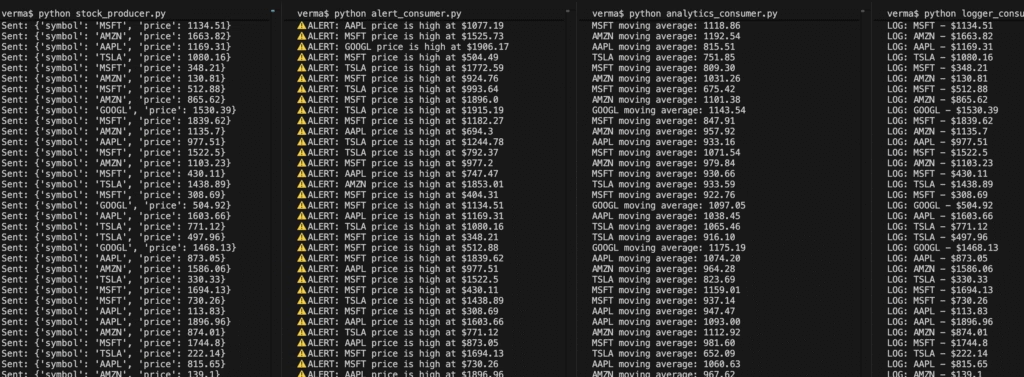
Idea:
- The producer simulates live stock price updates.
- Consumers do different things:
- Alert Service: Alerts when the price goes above/below the threshold.
- Logger: Logs all prices.
- Analytics: Computes simple statistics (e.g., moving average).
Create topic:
kafka-topics --create --topic stock_prices --bootstrap-server localhost:9092Producer — Simulate Live Stock Prices
from kafka import KafkaProducer
import json
import random
import time

producer = KafkaProducer(
    bootstrap_servers=['localhost:9092'],
    value_serializer=lambda v: json.dumps(v).encode('utf-8')
)

stocks = ["AAPL", "GOOGL", "AMZN", "TSLA", "MSFT"]

while True:
    stock = random.choice(stocks)
    price = round(random.uniform(100, 2000), 2)
    event = {"symbol": stock, "price": price}

    producer.send('stock_prices', event)
    producer.flush()
    print(f"Sent: {event}")
time.sleep(1) # simulate real-time streamAlert Consumer — Notify on Threshold
from kafka import KafkaConsumer
import json

consumer = KafkaConsumer(
    'stock_prices',
    bootstrap_servers=['localhost:9092'],
    value_deserializer=lambda v: json.loads(v.decode('utf-8')),
    group_id='alert-service'
)

# Example thresholds
thresholds = {
    "AAPL": 150,
    "GOOGL": 1800,
    "AMZN": 1700,
    "TSLA": 700,
    "MSFT": 300
}

print("Alert Service Started...")

for msg in consumer:
    stock = msg.value
    symbol = stock['symbol']
    price = stock['price']

    if price > thresholds[symbol]:
print(f"⚠️ ALERT: {symbol} price is high at ${price}")Logger Consumer — Log All Prices
from kafka import KafkaConsumer
import json

consumer = KafkaConsumer(
    'stock_prices',
    bootstrap_servers=['localhost:9092'],
    value_deserializer=lambda v: json.loads(v.decode('utf-8')),
    group_id='logger-service'
)

print("Logger Service Started...")

for msg in consumer:
    stock = msg.value
print(f"LOG: {stock['symbol']} - ${stock['price']}")Analytics Consumer — Compute Simple Metrics
\from kafka import KafkaConsumer
import json
from collections import defaultdict

consumer = KafkaConsumer(
    'stock_prices',
    bootstrap_servers=['localhost:9092'],
    value_deserializer=lambda v: json.loads(v.decode('utf-8')),
    group_id='analytics-service'
)

prices = defaultdict(list)
print("Analytics Service Started...")

for msg in consumer:
    stock = msg.value
    symbol = stock['symbol']
    price = stock['price']

    prices[symbol].append(price)
    if len(prices[symbol]) > 5:  # moving window
        prices[symbol].pop(0)

    moving_avg = sum(prices[symbol]) / len(prices[symbol])
    print(f"{symbol} moving average: {moving_avg:.2f}")
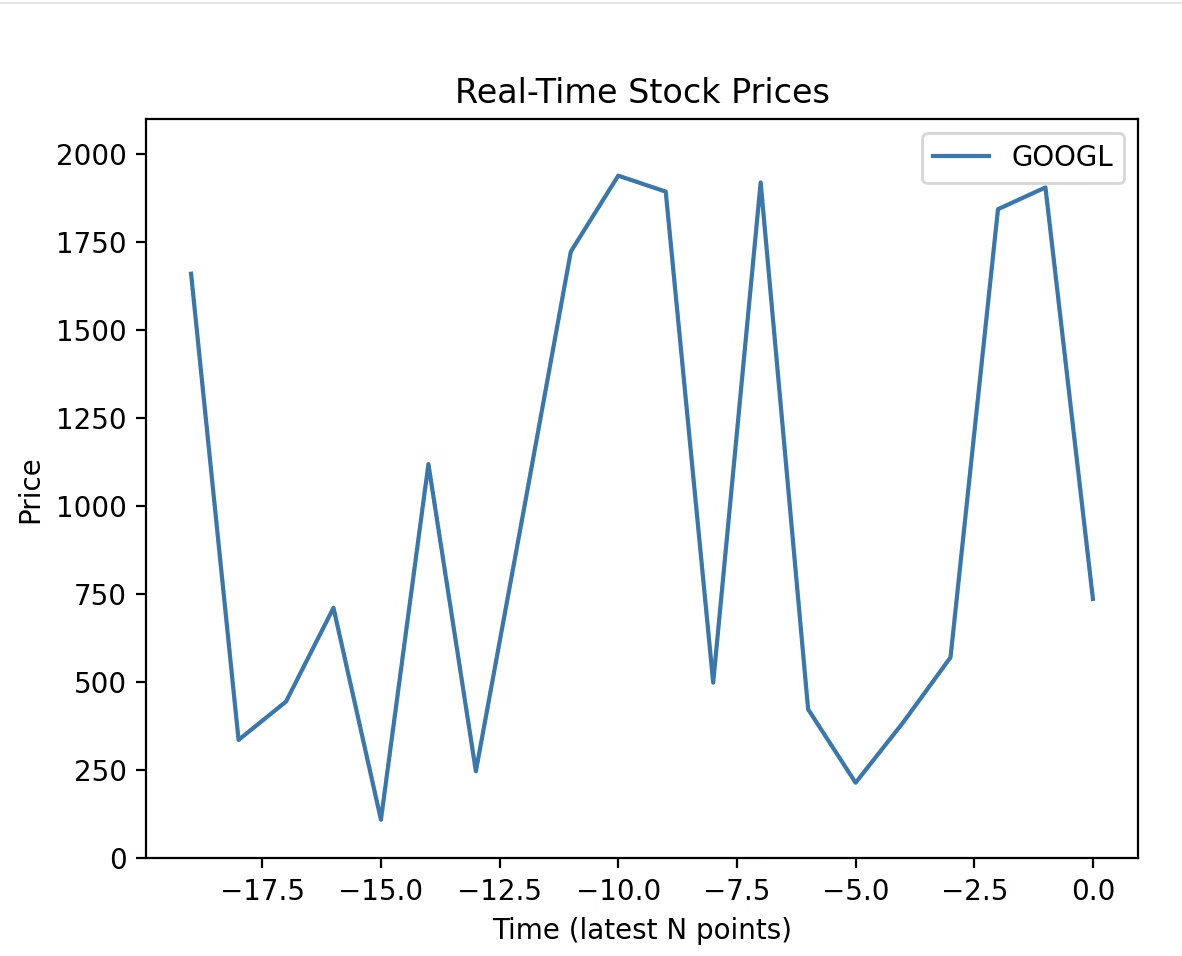
Real-Time Plotting Consumer
from kafka import KafkaConsumer
import json
import matplotlib.pyplot as plt
from matplotlib.animation import FuncAnimation
from collections import defaultdict
import threading

# Kafka consumer
consumer = KafkaConsumer(
    'stock_prices',
    bootstrap_servers=['localhost:9092'],
    value_deserializer=lambda v: json.loads(v.decode('utf-8')),
    group_id='plotting-service'
)

# Store last N prices
N = 20
prices = defaultdict(list)
time_index = list(range(-N+1, 1))  # x-axis

# Thread to consume Kafka messages
def consume():
    for msg in consumer:
        stock = msg.value
        symbol = stock['symbol']
        price = stock['price']

        prices[symbol].append(price)
        if len(prices[symbol]) > N:
            prices[symbol].pop(0)

threading.Thread(target=consume, daemon=True).start()

# Plotting setup
fig, ax = plt.subplots()
lines = {}
#for stock in ["AAPL", "GOOGL", "AMZN", "TSLA", "MSFT"]:
for stock in ["GOOGL"]:

    line, = ax.plot(time_index, [0]*N, label=stock)
    lines[stock] = line

ax.set_ylim(0, 2100)
ax.set_xlabel('Time (latest N points)')
ax.set_ylabel('Price')
ax.set_title('Real-Time Stock Prices')
ax.legend()

# Update function for animation
def update(frame):
    for stock, line in lines.items():
        ydata = prices.get(stock, [0]*N)
        if len(ydata) < N:
            ydata = [0]*(N-len(ydata)) + ydata
        line.set_ydata(ydata)
    return lines.values()

ani = FuncAnimation(fig, update, interval=1000)
plt.show()Output
Companies that use Kafka
Goldman Sachs, PayPal, JPMorgan Chase
- Use Kafka for real-time fraud detection, transaction monitoring, and trade event streaming.
- Kafka connects multiple services in their microservices architecture to ensure fast, reliable data delivery.
Uber, Lyft
- Kafka powers real-time trip tracking, dynamic pricing, driver matching, and ETA calculation.
- Every location update, event, or user action is streamed through Kafka.
Amazon, Walmart, Alibaba
- Kafka handles order processing, inventory updates, recommendation pipelines, and clickstream analytics.
- It connects different systems (like checkout, payment, and delivery) using event streams.
- Kafka was created by LinkedIn to handle activity streams and operational metrics.
- It powers feed updates, messaging, and analytics pipelines (billions of messages per day).
Twitter, Pinterest
- Use Kafka for real-time engagement analytics, notifications, and ad analytics.
Netflix
- Kafka connects user activity logs, recommendation systems, and real-time monitoring.
- It’s also used for alerting, metric collection, and content delivery optimisations.
Spotify
- Uses Kafka for user interaction events, playlist updates, and real-time analytics.
FedEx, DHL
- Kafka streams package tracking updates, sensor data, and route optimisations across systems.
Siemens, Bosch
- Kafka ingests and processes sensor data from industrial machines in real-time for analytics and maintenance alerts.
Confluent (Kafka creators), Snowflake, Databricks
- Use Kafka for data ingestion pipelines, stream processing, and feeding ML models with real-time data.
Telecom companies (Jio, AT&T, Verizon)
- Use Kafka for network monitoring, usage analytics, and billing event pipelines.
What is Kafka Streams API?
Kafka Streams is a Java library (not a separate cluster or service) that allows you to build real-time, event-driven applications that process data stored in Apache Kafka topics.
It turns Kafka into a stream processing platform, where you can read, process, and write data continuously.
Kafka Streams is a Java library for building real-time streaming applications on top of Apache Kafka. Unlike a regular Kafka consumer/producer setup, Kafka Streams provides a high-level API for processing and transforming data streams with powerful features like stateful operations, windowing, joins, and aggregations.
Zookeeper for Kafka
Apache Kafka uses ZooKeeper (though newer versions can run without it using KRaft mode) to manage its cluster metadata and coordinate distributed processes. Here’s a clear breakdown of the role of ZooKeeper in Kafka:
Cluster Management
- ZooKeeper keeps track of all Kafka brokers in the cluster.
- It knows which broker is alive and part of the cluster.
- If a broker fails, ZooKeeper notifies Kafka so partitions can be reassigned.
Leader Election
- Each Kafka topic partition has a leader broker and multiple follower replicas.
- ZooKeeper handles leader election for partitions:
- If a leader fails, ZooKeeper chooses a new leader among the followers.
Metadata Storage
- ZooKeeper stores cluster metadata:
- Broker IDs
- Topic names
- Partition info
- ACLs (access control lists)
- Brokers fetch metadata from ZooKeeper on startup and keep it updated.
Configuration Management
- ZooKeeper can hold dynamic configurations for brokers and topics.
- Changes can be applied without restarting the Kafka brokers.
Health Monitoring
- ZooKeeper uses heartbeats to check if brokers are alive.
- It helps maintain cluster consistency by detecting dead brokers quickly.
Controller Election
- One broker is elected as the controller of the Kafka cluster.
- ZooKeeper manages the controller election, which handles partition leadership and replication assignments.
Summary
- ZooKeeper acts as the central coordinator and metadata manager for Kafka, ensuring high availability, fault tolerance, and consistency.
- Kafka 2.8+ introduced KRaft mode, which removes the need for ZooKeeper by managing metadata internally, but many production clusters still use ZooKeeper.
Conclusion
Apache Kafka is more than just a messaging system—it’s the central nervous system for modern data architectures. Whether for real-time analytics, microservices communication, or large-scale data pipelines, Kafka provides a reliable, scalable, and flexible foundation.
Organisations like LinkedIn, Netflix, Uber, and Airbnb rely on Kafka to power billions of daily events—and its adoption continues to grow.

1 thought on “Apache Kafka: A Complete Guide”