Bit manipulation is a fundamental technique in programming that involves operating directly on bits—the basic units of information in computers. It enables high-performance solutions for many computational problems, particularly in competitive programming, cryptography, embedded systems, and optimisation tasks. Understanding bitwise operations can significantly improve code efficiency and reduce execution time.
Table of Contents
Binary Number
Computers only understand binary — a series of 1s and 0s.
Binary representation is a way of expressing numbers using only two digits: 0 and 1. It is the fundamental language used by computers because digital systems operate using two states—typically represented as off (0) and on (1).
In binary, each position represents a power of 2, starting from the right. For example, the binary number 1011 can be understood as:
1x2^3 + 0x2^2 + 1x2^1 + 1x2^0 = 8 + 0 + 2 + 1 = 11Binary representation is used to store all types of data in a computer, including numbers, text, images, and instructions. For integers, computers typically use formats like unsigned binary or two’s complement (for representing negative numbers).
This system is important because it directly maps to hardware operations, making computations efficient and reliable in digital electronics.
Binary representation
At a low level, everything in a computer is just bits (0s and 1s). But how those bits are interpreted makes all the difference. Two of the most important ways to interpret binary numbers are unsigned binary and two’s complement.
Unsigned Binary Representation
Unsigned binary is the simplest form of number representation. In this system, all bits are used purely to represent the magnitude (value) of the number. There is no concept of negative numbers.
Each bit position corresponds to a power of 2. Starting from the rightmost bit (least significant bit), the powers increase:
2^0, 2^1, 2^2, and so on.
For example, consider the binary number 1011:
1x2^3 + 0x2^2 + 1x2^1 + 1x2^0 = 8 + 0 + 2 + 1 = 11So, 1011 represents 11 in decimal.
If we use n bits, the range of numbers we can represent is:
- Minimum: 0
- Maximum:2^n -1
For example:
- 4 bits → 0 to 15
- 8 bits → 0 to 255
This system is straightforward and efficient when you only need non-negative values. However, it completely fails when negative numbers are required.
The Need for Signed Representation
In real-world computations, we frequently deal with positive and negative numbers. So we need a binary system that can represent both positive and negative integers. You need them for subtraction, balances, temperature values, and much more.
Ways to represent signed numbers
- Using Sign Bit
- Two’s Complement
Using the sign bit
In this, we reserved the most significant bit(MSB) for the sign(+ve or -ve) of the number, and the remaining bits will be the value of the number.
First bit(MSB) = sign
- 0 → positive
- 1 → negative
Remaining bits = value
Example (4 bits):
| Binary | Meaning |
|---|---|
| 0 101 | +5 |
| 1 101 | -5 |
While it’s you represent, but there are a few exist underling problems like:
Problem 1: Two zeros
You get two representations of zero:
- 0000 → +0
- 1000 → -0
👉 Computers don’t like this—it creates ambiguity.
Problem 2: Arithmetic becomes messy
Let’s try addition:
(+5) + (-5)
  0101
+ 1101
------
10010 (incorrect in simple sign system)- You need special rules to handle the sign separately
- The addition logic becomes complicated
- Difficult for human-level analysis
👉 Hardware becomes inefficient
Problem 3: Extra logic needed
With the sign-bit method:
- Addition ≠ subtraction
- You need separate handling for:
- positive + positive
- positive + negative
- negative + negative
👉 This increases complexity a lot
Two’s Complement: A Better Way
Simply reserving one bit as a sign (like “+” or “−”) is not enough because it complicates arithmetic operations.
This is where two’s complement comes in—a clever system that allows both positive and negative numbers while keeping arithmetic simple and consistent.
Two’s complement solves all of these problems:
Single Zero
- 0 = 00000000
- No negative zero.
Unified Arithmetic
Addition, subtraction, and even multiplication — all work with the same binary logic.
- No need for if/else or a separate “signed math unit”
  5: 00000101
 -5: 11111011  (Two’s complement)
----------------
Sum: 00000000Seamless Wraparound
If you keep incrementing the max positive number, you automatically get the most negative number.
For 8-bit:
+127 = 01111111
+128 (overflow) → -128 = 10000000This “wrapping” is exactly how unsigned integers work, too — reusing existing logic.
Conclusion
- Arithmetic operations (addition, subtraction) work the same way as unsigned numbers.
- There’s only one representation for zero.
- The most significant bit (leftmost bit) is the sign bit:
- 0 means positive
- 1 means negative
Sign representation also has the MSB for sign bit, and 2’s also has the MSB for sign bit. Then what is the difference?
While both Signed Magnitude and 2’s Complement use the Most Significant Bit (MSB) to indicate the sign (0 for positive, 1 for negative), the fundamental difference lies in how the remaining bits are interpreted and how the CPU performs arithmetic.
The Value of the MSB
In Signed Magnitude, the MSB is just a “flag”. In 2’s Complement, the MSB has a specific negative weight.
- Signed Magnitude: The MSB tells you the sign, and the rest of the bits represent the absolute value (magnitude).
- 2’s Complement: The MSB represents -2(n-1). For an 8-bit number, the MSB isn’t just “negative”; it represents the value -128.
| Bit Pattern | Signed Magnitude | 2’s Complement |
011 | +3 | +3 |
010 | +2 | +2 |
001 | +1 | +1 |
000 | +0 | 0 |
111 | -3 | -1 |
110 | -2 | -2 |
101 | -1 | -3 |
100 | -0 | -4 |
For n-bit ranges:
- Signed Magnitude: [-(2^(n-1) – 1) to (2^(n-1) – 1)]
- 2’s Complement: [-2^(n-1) to (2^(n-1) – 1)]
Two’s Complement in details
Two’s complement is the most common method of representing signed integers in binary systems. It simplifies arithmetic operations and eliminates the need for a separate representation of negative signs.
2’s Calculation
- Flip bits
- Add 1
Example 1

+5	00000101

Step 1 : Flip bits 11111010
Step 2 : Add 1:11111010+1 = 11111011
2s => 11111011

Example 2
+8	00001000

Step 1 : Flip bits 11110111
Step 2 : Add 1:11110111+1 = 11111000
2s => 11111000
We already know Fliping all bits is 1’s, so we say
2's complement(2^n) = 1's complement + 1Notation
- 1’s x => ~x
- 2’s x => -x
2's complement(2^n) = 1's complement + 1

-x = ~x + 1What does -x represent?
Take an example x =5
2's(x) = 1s(x)+1

2's(5) = 1s(5)+1

-5 = 1111 1010 +1
-5 = 1111 1011The 2’s complement of x is literally the value -x
More Example 2
Example 2
+8	00001000
-8	11111000

Step 1 : 8 -> 00001000
Step 2 : invert all bit 11110111
Step 3 : Add 1:11110111+1 = 11111000
So, -8 = 11111000Think of it like a Mirror
- 2’s complement (5) = -5
- 2’s complement (-5) = 5
Mirror Formula
While Signed Magnitude is a linear scale that breaks at zero, 2’s complement is a continuous loop.
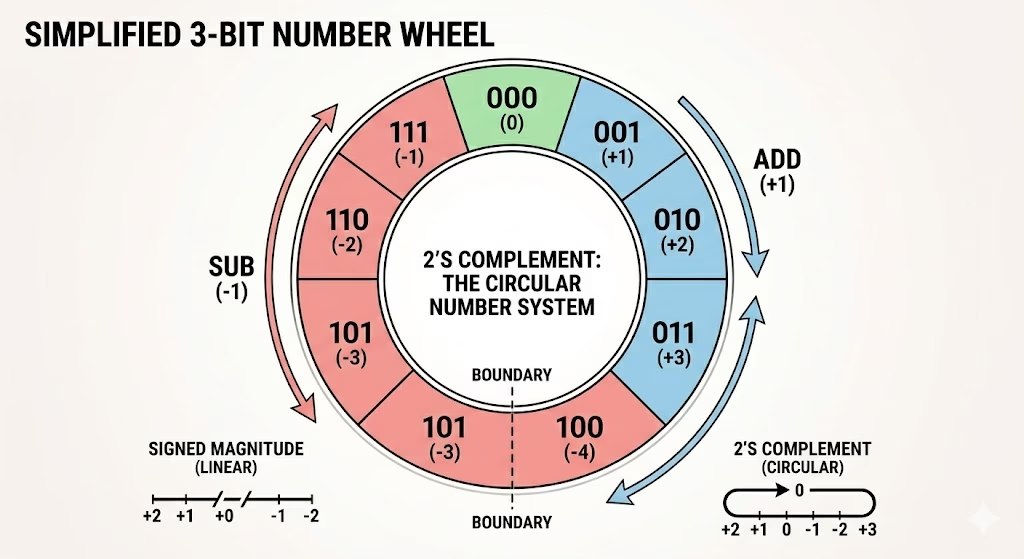
Because it’s a circle, the formula -x = ~x + 1 makes perfect sense:
- ~x (1’s complement) effectively finds the position on the opposite side of the circle
- The +1 corrects the slight offset caused by the fact that we only have one zero.
Why is this a “Superpower” for CPUs?
Because 2’s complement is -x, the computer doesn’t actually need a “subtraction” circuit. It only needs an “addition” circuit.
When you tell a computer to do
10 - 5,
It internally performs : 10 + 2's complement of (5)

10 + (-5) = 5It turns every subtraction problem into a simple addition problem, which is why your computer can run so fast with simpler hardware.
One Small “Glitch” to Remember
There is exactly one number where this doesn’t work perfectly: The Most Negative Number.
In a 4-bit system, the range is -8 to +7.
If you try to find the 2’s complement of -8 (1000):
- Flip bits: 0111
- Add 1: 1000
You get -8 back! This happens because +8 doesn’t exist in a 4-bit signed system. It’s the only “weird” case in an otherwise perfect system.
When does the CPU use 2’s?
The computer stores positive numbers as simple binary and negative numbers as 2’s complement binary.
| Actual Value | Binary Pattern | Did it use 2’s Complement Logic? |
| +3 | 0011 | No (Direct Binary) |
| +2 | 0010 | No (Direct Binary) |
| +1 | 0001 | No (Direct Binary) |
| 0 | 0000 | No (Direct Binary) |
| –1 | 1111 | Yes (Converted from 0001) |
| –2 | 1110 | Yes (Converted from 0010) |
| -3 | 1101 | Yes (Converted from 0011) |
Understanding Bitwise Operators
Bitwise operations work at the binary level and are faster than arithmetic operations. In most programming languages, the following bitwise operators are available:
Bitwise AND (&):
Sets a bit if both corresponding bits are 1.
0 & 0 = 0
0 & 1 = 0
1 & 0 = 0
1 & 1 = 1

24 & 16 => 11000 & 10000 => 10000=> 16
5 & 3 => 1101 & 0011 => 0001 => 1 Properties
AND with 1
5&1 => 1101 & 0001 => 1
4&1 => 100 & 001 => 0
15&1 =>1111 & 0001 => 1
24&1 => 11000 & 00001 => 0 Even Odd
We have either 1 or 0, based on the results
- If 1, the number is odd
- If 0, the number is even
Explanation
see all odd ends with 1 , even with 0

0 -> 000
1 -> 001
2 -> 010
3 -> 011
4 -> 100
5 -> 101
6 -> 110
7 -> 111

1 -> 1
so a&1
even 0&1 = 0
odd 1&1 =1The last bit of binary representation
- 24=>11000 => 0
- 15=>1111 => 1
Remainder: It gives a remainder when dividing the number by 2
24 % 2 =>  24 & 1 => 0

15 % 2 => 15 & 1 => 1Bitwise OR (|):
- Sets a bit if at least one of the corresponding bits is 1.
- Example: 5 | 3 (0101 | 0011) = 0111 (7 in decimal)
0 | 0 = 0
0 | 1 = 1
1 | 0 = 1
1 | 1 = 1

5 | 3 = 0101| 0011 = 0111 = 7Bitwise XOR (^):
- Sets a bit if only one of the corresponding bits is 1.
- Example: 5 ^ 3 (0101 ^ 0011) = 0110 (6 in decimal)
0 ^ 0 = 0
0 ^ 1 = 1
1 ^ 0 = 1
1 ^ 1 = 0

5 ^ 3 = 0101 ^ 0011 = 0110 = 6Properties
- XOR of a number with itself is zero (x^x = 0)
- XOR of a number with zero is the number itself (x^0=x)
- XOR is reversible and commutative (x^y=y^x)
Bitwise NOT (~):
- Inverts all bits (also known as the bitwise complement).
- Example: 101001 –> 010110
Way 1 : Directly inverting all bits


Way 2 : Uisng 2's
~x = -x - 1- -x is represented using the 2’s complement of x
Proof
~x = -x - 1 (~x → flips all bits (1's complement))


1's complement = -x -1

1's complement + 1 = -x

2's complement = -x
- ~x = -x – 1 ← 1’s complement (just flip bits)
- ~x + 1 = -x ← 2’s complement (flip bits + add 1)
So, to store -x, we take the 2’s complement of x
Example
Example 1:
x = 5        # Binary:  0101

Way 1:  By inverting all bit
=> 1010 as MSB is 1 , we need to apply 2s

2s(1010) => 0110 => -6

print(~x)  # Output: -6 (Binary: 1010)

Way 2 By formula:
~x = -x-1 = -6

Example 2:
 1 = 0001
~1 = 1110

As Msb 1 apply 2s(1110)

=> 0010 => -2


Example 3:
 x =  8
~x = -9

Example 4:
 x =  24
~x = -25

Example 5:
x = -4

Way 1 : Directly inverting bits
as its -ve => 1100
Inverting 0011 => 3

Way 2 : By 2s
~x = -(-4) - 1 => 3
Example
x -> ~x
0 -> -1
1 -> -2
2 -> -3
3 -> -4
4 -> -5Which one ~1 =0 or ~001 = 110 ?
~1 = 0 is wrong:
That would only happen if 1 had a single bit, which is not how integers are stored in memory.
What actually happens with ~1:
- The bitwise NOT (~) does NOT turn 1 into 0.
- Instead, it flips every bit in the binary representation of the number.
Because numbers are stored in two’s complement form (to represent signed integers), flipping bits of 1 results in the binary representation of -2, not 0.
Example
Binary for 1 (in 8 bits for simplicity):
00000001


Bitwise NOT flips bits:
11111110 # In two's complement, 11111110 represents -2, not 0.Bit deeper
- MSB tells sign ✔️
- If MSB = 0 → read normally
- If MSB = 1 → number is already in 2’s complement form
- → decode (flip + 1) to get magnitude
- → then add a negative sign
Wrong example
- 0011 → 3 ✅
- 1011 → NOT -3 ❌
Leftmost is negative, but it does mean put a -ve sign get number (e.g., -3)
Correct example
Let’s decode 1011 (4-bit):
- MSB is negative
- So, it’s in 2’s complement form
- Now decode (two’s complement):
- Flip → 0100
- +1 → 0101 = 5
- put the sign = -5 ✅
Conclusion
MSB = 0 → direct
MSB = 1 → flip + 1 → add minusBinary numbers in a computer are already stored correctly
- Positive numbers → stored directly
- Negative numbers → stored in two’s complement form
We decode only when the number is negative (MSB = 1), to understand its decimal value.
Bitwise NOT vs Logical NOT
- ~ is bitwise NOT — flips bits.
- ! or not is logical NOT — flips truthiness (True to False, 1 to 0 logically).
~0 = 1
~1 = 0

Example: ~5 (0101) = 1010 (in two’s complement representation, this is -6)Left Shift (<<):
- Shifts bits to the left, effectively multiplying by powers of 2.
- Example: 5 << 1 (0101 << 1) = 1010 (10 in decimal)
- number<<n; n zeroes will be added to the right side of the binary(number)
Example:
e = x*2^a + y*2*b
e<<1 = x*2^a*2 + y*2^b*2 = 2*(x*2^a + y*2*b)x<< bits
x<< bits = x* 2^bits
Example 1
1    = 001 = 1 = 2^0
1<<2 = 100 = 4 = 2^2
1<<10 => 2^10


1 << bits = 2^bits


Example 2  5(101)
5 <<1 = 5 *2^1 = 10 (1010)

5 << 2 = 5 * 2^2 = 5 * 4 = 20 (10100)

Example 3
3 << 3 = 3 * 2^3 = 3 * 8 = 24


Example 4

print(bin(1))    #0b1
print(bin(1<<1)) #0b10
print(bin(1<<2)) #0b100
print(bin(1<<3)) #0b1000Generate a binary number with exactly n 1’s
( 1 << n ) -1
This gives a bitmask with all n bits set to 1.
- For 8-bit:
- (1 << 8) – 1 = 256 – 1 = 255 → binary: 11111111
- For 4-bit:
- (1 << 4) – 1 = 16 – 1 = 15 → binary: 1111
1<<8 = 1 0000 0000 => it become 9 bits
so -1 => will max value of 8 bit


1<<8 = 2^8 = 256Points to be noted
If we 8 bit system
| 1 << n | 1 << n -1 |
| 1 << 3 = 0000 1000 | 0000 0111 |
| 1 << 7 = 0100 0000 | 0111 1111 |
| 1 << 8 = 1 0000 0000 –> 0000 0000 (Overflow as we have an 8-bit system) | 1111 1111 |
| 1<<9 = 1 0 0000 00000 -> 0000 0000 (Overflow as we 8 bit system) | 1111 1111, it’s wrong |
So it accidentally works at the boundary (here 8 bits ) on most hardware, but breaks silently beyond it
Why It’s Needed
Python integers are unbounded (no fixed size), but hardware integers are not.
- This trick forces Python to behave like an N-bit machine.
- It trims the number to N bits as hardware would store it.
Summary
| Expression | Meaning |
|---|---|
1 << bits | Powers of 2 (e.g., 256 for 8-bit) |
(1 << bits) - 1 | Mask with bits 1s (e.g., 255 = 0b11111111) |
n & mask | Keep only bits bits from n |
Right Shift (>>):
- Shifts bits to the right, effectively dividing by powers of 2.
- Example: 5 >> 1 (0101 >> 1) = 0010 (2 in decimal)
Example:
e = x*2^a + y*2*b
e>>1 = x*2^a/2 + y*2^b/2 = (x*2^a + y*2*b)/2x = 20 # 10100 in binary
print(x >> 1) # 10 (1010) #loss of bits
print(x >> 2) # 5 (101) #loss of bitsLoss of bits
When you perform a right shift (>>), bits are lost because they move out of the lower end of the number. However, in a left shift (<<), no bits are lost because integers can grow dynamically.
Bitwise Operators and Logical Operators
Bitwise operators operate on the individual bits of a number, while logical operators operate on boolean values (True or False). For example, the bitwise AND operator (&) will compare each bit of two numbers and return a new number where each bit is set to 1 only if both corresponding bits of the original numbers are 1. On the other hand, the logical AND operator (and) will return True only if both operands are True.
Bitwise operators and logical operators are used for different purposes in programming. Bitwise operators work directly on binary bits of numbers and include operators like & (AND), | (OR), ^ (XOR), ~ (NOT), << (left shift), and >> (right shift). They are mainly used in low-level programming, optimisation, and binary manipulation. Logical operators, on the other hand, work with Boolean values (True and False) and are used for decision-making in conditions. Common logical operators are and, or, and not. For example, 5 & 3 performs a bit-level operation and gives 1, while 5 and 3 is a logical operation and returns 3 in Python because both values are truthy.
Code for 2’s complement
Case 1: n = ~n+1
- Invert the bits → ~5
- Add 1
Example for 8bit
+5 = 00000101
~5 = 11111010
+1 = 11111011 ← This is the 8-bit two's complement of -5Case 2: Using Mask: x & ((1 << n) – 1)
This is the programmatic trick that simulates the same thing automatically:
Forces Python to:
- Mask off only the lowest N bits (like 8 or 16)
- Simulate fixed-width integers
- Match how real machines store and represent negative values using two’s complement.
Example for 8-bit
-5 & ((1 << 8) - 1)
= -5 & 255
= 251
= 11111011 Why is case 2 required?
Case 2 is required for some programming languages, like Python
- Python integers are arbitrary-precision (they can grow as large as needed). So no overflow issues at all
- Python does not automatically wrap around bits like hardware does.
- So, to simulate hardware-like behaviour, we need to mask it manually
C or C++:
- int, short, and char have fixed sizes (e.g., int = 32 bits).
- You don’t need to mask it, because the hardware + compiler already does the wraparound and bit-limiting for you.
When you do:
int n = -5;
printf("%x", n);C automatically stores -5 using two’s complement in 32-bit, e.g.:
Summary
| Language | Integer Type | Two’s Complement Needed? | Use Mask? |
|---|---|---|---|
| Python | Arbitrary precision | Not automatic | Must use n & ((1<<bits)-1) |
| C/C++ | Fixed-size (e.g., int32) | Automatic | Not needed |
| Java | Fixed-size (int, byte) | Automatic | Not needed |
In Python,
- We use n & ((1 << bits) – 1) to simulate what languages like C do natively.
- ((1 << bits) – 1) Forces the result to be clipped to exactly N bits, just like hardware would do.
- You must manually restrict the result to a fixed number of bits — because Python doesn’t do it for you.
Python Stores integers with unlimited bits, but hardware. Uses fixed-size bits (e.g., 8, 16, 32). So to simulate fixed-size behaviour in Python, we use this
Programming 2’s complement in Python
Way1: Dynamic bits
def twos_complement(n, bits):
    return format(n & ((1 << bits) - 1), f'0{bits}b')


print("  5 (8-bit):", twos_complement(5, 8))     # 00000101
print(" -5 (8-bit):", twos_complement(-5, 8))   # 11111011

print("  5 (16-bit):", twos_complement(5, 16))   # 0000000000000101
print(" -5 (16-bit):", twos_complement(-5, 16)) # 1111111111111011

print("  5 (4-bit):", twos_complement(5, 4))     # 0101
print(" -5 (4-bit):", twos_complement(-5, 4))   # 1011
Way 2: Fixed Width
- 1<<bits => 2^bit
- (1<<bits) -1 => 2^bit-1
2^bit-1 represents the maximum value that can be represented using bit number of bits.
# For 4-bit
def twos_complement_4bit(n):
    return format(n & 0xF, '04b')  # 0xF = 15 = 4 bits

# For 16-bit
def twos_complement_16bit(n):
    return format(n & 0xFFFF, '016b')  # 0xFFFF = 65535 = 16 bits

# For 32-bit
def twos_complement_32bit(n):
    return format(n & 0xFFFFFFFF, '032b')  # 0xFFFFFFFF = 32 bits
Inbuilt function in Python
Built-in functions for base
- bin(10) → ‘0b1010’ — the 0b prefix tells you it’s binary. Strip it with [2:].
- hex(255) → ‘0xff’ — prefix 0x.
- oct(8) → ‘0o10’ — prefix 0o.
Back to decimal — int() with a base argument handles all cases:
- int(‘1010’, 2) # 10
- int(‘0xff’, 16) # 255 ← Python accepts the 0x prefix automatically
- int(‘0o10’, 8) # 8 ← same for 0o
Conversions out of decimal produce strings. int() converts them back to an integer.
0ther functions
Count set bits
bin(13).count('1') # 3 (13 = 1101)How many bits are set to 1?
i.e., It counts the number of 1s in the binary representation.
(10).bit_count()    # 2  → 10 = 1 0 1 0 → two 1s
(1).bit_count()     # 1  → 1 = 0 0 0 1 → one 1
(8).bit_count() # 1 → 8 = 1 0 0 0 → one 1bit_count vs count
bit_count and count give the same results; the only difference is
count works on binary, while bit_count works on integers
n = 13  # 1101

bin(n).count('1')   # 3
n.bit_count() # 3How many bits to represent the number?
i.e., It tells you the position of the highest set bit.
(10).bit_length()   # 4  → because 10 = 1 0 1 0 → needs 4 bits
(1).bit_length()    # 1  → 1 → needs 1 bit
(8).bit_length() # 4 → 8 = 1 0 0 0 → needs 4 bitsNumbers are just Numbers in Python
In Python, there is no such thing as a “binary variable.” No matter how you write a number, Python always stores it as a plain integer in memory.
a = 0b111   # binary notation
b = 7       # decimal notation
c = 0x7     # hex notation

print(a == b == c)  # True — all the same!
print(type(a)) # <class 'int'>All three are identical — Python forgets how you wrote them the moment they’re stored.
mask = 0b111    # Python stores 7
a = 0b11101     # Python stores 29

result = mask & a

print(result)        # 5  ← decimal (Python's default)
print(bin(result))   # 0b101 ← you asked for binary display
print(hex(result)) # 0x5 ← you asked for hex displayThe value never changes — only the display format changes depending on what you ask for.
Bottom line: Binary, decimal, and hex are just notations to write numbers, not types. Python only knows one type — int. If you want to see it in binary, you must use bin() every time you print — there’s no way around it
0b111 vs ‘0b111’ in Python
These two look almost identical but are completely different things:
a = 0b111    # integer
b = '0b111'  # string

print(type(a))  # <class 'int'>
print(type(b)) # <class 'str'>- 0b111 is a number — the 0b prefix tells Python “read this as binary”, and Python converts it to the integer 7. The 0b prefix is gone after that; Python just stores 7.
- ‘0b111’ is text — the quotes make it a string. Python doesn’t care about the 0b inside; it’s just 5 random characters like ‘hello’.
Bitwise operations
mask = 0b111
x    = 0b11101

print(mask & x)        # 5  ✅ works

mask = '0b111'
x    = '0b11101'
print(mask & x) # ❌ TypeError: unsupported operand type for &: 'str' and 'str'For bitiwise use 0b11101 not ‘0b11101’
Bitmask
Just like a mask on your face hides part of it, a bitmask “hides” or “focuses” on specific bits in a number.
AND (&) – Clear everything except selected bits
Keep only specific bits (e.g. lower 4 bits)
x = 0b10101101  # 173 in decimal
mask = 0b00001111  # Mask to keep only the last 4 bits

result = x & mask
#   1 0 1 0 1 1 0 1
# & 0 0 0 0 1 1 1 1
#   ---------------
#   0 0 0 0 1 1 0 1  → 0b00001101 → 13

print(result)        # 13
print(bin(result))   # 0b1101

print(173&15) #13OR (|) – Set specific bits to 1
Turn on certain bits (e.g. set the 4th bit)
x = 0b00001001  # 9 in decimal
mask = 0b00000100  # Bit to set (3rd bit)

result = x | mask
#   0 0 0 0 1 0 0 1
# | 0 0 0 0 0 1 0 0
#   ---------------
#   0 0 0 0 1 1 0 1 → 0b00001101 → 13

print(result)        # 13
print(bin(result))   # 0b1101
XOR (^) – Toggle specific bits
Flip certain bits (e.g. toggle 0 → 1 or 1 → 0)
x = 0b00001100  # 12
mask = 0b00000110  # Toggle 2nd and 3rd bits

result = x ^ mask
#   0 0 0 0 1 1 0 0
# ^ 0 0 0 0 0 1 1 0
#   ---------------
#   0 0 0 0 1 0 1 0 → 0b00001010 → 10

print(result)        # 10
print(bin(result))   # 0b1010
NOT (~) – Invert all bits
Use case: Flip every bit (used in two’s complement, bitwise tricks)
x = 0b00001100  # 12
result = ~x

print(result)        # -13 (in Python, infinite-bit integer)
print(bin(result)) # -0b1101Note:
- Python uses infinite-bit integers, so ~x = -(x + 1)
- ~12 = -13 because 00001100 → 11110011 (in 8-bit) → -13 in two’s complement
Clear a specific bit
Clear the 3rd bit
x = 0b00001111  # 15
mask = ~(1 << 2)  # Clear bit at position 2 (count from 0)

result = x & mask
#   0 0 0 0 1 1 1 1
# & 1 1 1 1 1 0 1 1
#   ---------------
#   0 0 0 0 1 0 1 1 → 0b00001011 → 11

print(result)        # 11
print(bin(result))   # 0b1011

'''
1      = 001
1 << 2 = 100
~100   = 011

result = x&011
'''Flipping 1 to 0 to clear the bits
Get a binary with p lower bits set to 1
mask : (1<<p)-1Let’s suppose we need to keep the lowest 3 bits
Bitmask required will ……000111
Logic to generate the bitmask
- 1<<3 => 1 0 0 0
- (1<<3) -1 => 0 1 1 1
So, 1<<p gives 1 at the pth position and 1<<p-1 , give all p bit set 1
Examples

1<<0 = 1
1<<1 = 10
1<<2 = 100
1<<3 = 1000
1<<4 = 10000

1<<0 - 1 = 0
1<<1 - 1 = 1
1<<2 - 1 = 11
1<<3 - 1 = 1111
1<<4 - 1 = 1111Note ‘-‘ has higher precedence than ‘<<‘
print(bin(1<<3-1))   # 100
print(bin((1<<3)-1)) # 111


1<<3-1   ==> 1<<2   #100
(1<<3)-1 ==> 1000-1 #111So, be careful while using.
Keep the lowest bits
- Keep the lowest p bits as it is
- Discards(0) other bits
x & mask

x & ((1 << p) - 1)Example
Example 2: Keep lowest 3 bits

x = 101101

bitmask = 1<<3 -1 = 000111


X    1 0 1 1 0 1
mask 0 0 0 1 1 1
     --------------
AND  0 0 0 1 0 1
     ↑ ↑ ↑ ↑ ↑ ↑
   killed  kept


Example 2: Keep lowes 4 bits


  x    =  1 1 0 1 1 0 1 0
mask   =  0 0 0 0 1 1 1 1
          ─ ─ ─ ─ ─ ─ ─ ─
AND    =  0 0 0 0 1 0 1 0
          ↑ ↑ ↑ ↑ ↑ ↑ ↑ ↑
killed keptThis keeps only the lowest bits of n and discards everything else.
Used for finding the two’s complement. Read
Clearing the Rightmost Set Bit (lowest set bit)
Rightmost/Lowest set bit is the rightmost position that has value 1
E.g.,
1100  --> 1000
10101 --> 10100
11 --> 10 Mask
x & (x-1)Logic
- x-1 will clear the rightmost set bit in x. Subtraction only causes a borrow chain upward until it hits the lowest set bit — it stops there.
- Everything above that point is completely unaffected. The bits after the lowest set bit are identical in both n and n-1, so AND preserves them exactly.
Example 1

n       = 1 0 1 1 0 1 0 0 #180
                    ^
                    this one (lowest set bit, not the lowest bit position)

n - 1   = 1 0 1 1 0 0 1 1 #179
         ─────────────────
n&(n-1) = 1 0 1 1 0 0 0 0  = 176


Example 2

n     = 12  → 1 1 0 0
                ^
n - 1 = 11  → 1 0 1 1
-------------------------
AND → 1 0 0 0 = 8Even/Odd numbers
Finding even is straightforward
Way 1: Arithmetic
# Check if a number is even
num = int(input("Enter a number: "))

if num % 2 == 0:
    print(f"{num} is even")
else:
print(f"{num} is odd")Way 2: Bitwise operation
AND with 1 gives
- Last bit of that binary number
- Reminder when divided by 2
if num & 1 == 0:
    print(f"{num} is even")
else:
print(f"{num} is odd")A number is odd if its last bit is 1, even if its last bit is 0.
Power of 2
Any power of two in binary has exactly one bit set to 1.
| Number | Binary |
|---|---|
| 1 | 00001 |
| 2 | 00010 |
| 4 | 00100 |
| 8 | 01000 |
| 16 | 10000 |
We are already aware of a mask which remove right most set bit. Luckily, we have only one set bit and removing one set bit results in 0
mask = x & x-1
x & (x-1) = 0Logic
n > 0 and (n & (n - 1)) == 0Case when x = 0
- x = 0 → 0000
- x-1 = 0-1 -> -1 = 1111 (in two’s complement)
- 0&-1 => 0000&1111 => 0000
Case n<0 Negative numbers
Negative numbers can never be powers of 2
n = -8  →  11111000  (two's complement)
# (n & n-1) might accidentally passResult is 0, i.e., it’s a power of 2, which is wrong. Hence, we need to handle this (n>0)
def is_power_of_two(n):
    return n > 0 and (n & (n - 1)) == 0

print(is_power_of_two(16))  # True
print(is_power_of_two(18)) # FalseAll powers of 2 numbers are even except 1. So, if a number is odd, then it cannot be a power of 2. But if a number is even, then it may or may not be a power of 2.
- For example, 6 is an even number, but it is not a power of 2.
- On the other hand, 8 is an even number, and it is also a power of 2.
That’s why we have two logics
- Even/odd : n&1 == 0 even and n&1 == 1 odd
- Power of 2 : n > 0 and (n & (n – 1)) == 0
We can also find power by counting the number of set bits
#Brian Kernighan's Algorithm
def count_set_bits(n):
    count = 0
    while n:
        n = n & (n - 1)   # clears the lowest set bit each time
        count += 1
    return count

def is_power_of_two(n):
return n > 0 and count_set_bits(n) == 1Counting the Number of Set Bits
Sometimes it is referred to as Hamming weight.
Hamming Weight refers to the number of symbols that are different from the zero symbol of the alphabet used. In the context of binary numbers, it is the number of bits that are set to 1 in a binary representation of a number.
Method 1: Arithmetic(Division & Remainder):
def count_set_bits(n):
    count = 0
    while n:
        count += n % 2   # gives remainder (1 if odd, 0 if even)
        n //= 2          # integer division (drop last digit)
return countMethod 2: Bitwise & and right shift:
def count_set_bits(n):
    count = 0
    while n:
        count += n & 1   # checks last bit (1 if set, 0 if not)
        n >>= 1          # right shift by 1 (drop last bit)
    return count
- Checks every bit
- Time: O(number of bits)
Method 3: Brian Kernighan’s Algorithm
def count_bits(x):
    count = 0
    while x:
        x =  x & (x - 1)  # remove lowest 1
        count += 1
return countExample
x = 13 = 1 1 0 1

iteration 1: x = 1101 & 1100 = 1100  count = 1
iteration 2: x = 1100 & 1011 = 1000  count = 2
iteration 3: x = 1000 & 0111 = 0000  count = 3

x = 0 → loop stops- Each iteration x & (x-1) removes one set bit from x.
- So eventually all set bits get removed one by one → x becomes 0 → loop stops.
- Time: O(number of 1s) (faster when bits are sparse)
Key Difference
- Hamming → scans all bits
- Kernighan → skips zeros, directly removes 1s
Speed : Method 3 > Method 2 > Method 1
Isolates the rightmost/lowest set bit
Finding the rightmost set bit or finding the value of the rightmost set bit
x & -xThis works because -n is the two’s complement of n (i.e., ~n + 1), which flips all bits and adds 1. The net effect is that only the rightmost set bit aligns between n and -n.
Example
n      =  0 1 1 0 1 0 0
~n     =  1 0 0 1 0 1 1
~n + 1 =  1 0 0 1 1 0 0
----------------------------
AND = 0 0 0 0 1 0 0 Decimal (n) | Binary Representation | n & -n | Rightmost Set Bit Value |
|---|---|---|---|
| 1 | 0000001 | 0000001 | 1 |
| 2 | 0000010 | 0000010 | 2 |
| 3 | 0000011 | 0000001 | 1 |
| 4 | 0000100 | 0000100 | 4 |
| 5 | 0000101 | 0000001 | 1 |
| 6 | 0000110 | 0000010 | 2 |
| 7 | 0000111 | 0000001 | 1 |
| 8 | 0001000 | 0001000 | 8 |
| 10 | 0001010 | 0000010 | 2 |
| 12 | 0001100 | 0000100 | 4 |
| 16 | 0010000 | 0010000 | 16 |
| 18 | 0010010 | 0000010 | 2 |
| 32 | 0100000 | 0100000 | 32 |
| 40 | 0101000 | 0001000 | 8 |
| 64 | 1000000 | 1000000 | 64 |
Use cases:
- Bitmasking
- finding subsets or Binary Indexed Trees (Fenwick trees).
Set the Rightmost unset Bit
E.g., 1011 → 1111
x | (x + 1)Here’s why it works:
x+1 flips all the trailing 1-bits in x to 0 and flips the rightmost 0-bit to 1. When you OR that with x, all the bits that were already set stay set, and the rightmost 0-bit gets set too.
x   = 0000 1100 #12
x+1 = 0000 1101 #13

x | (x+1) = 0000 1101 #a3Sets all bits after the lowest set bit
x | (x - 1)Turns all bits after the rightmost 1-bit into 1s
x           = 1 1 0 0  #12
x - 1       = 1 0 1 1  #11
x | (x - 1) = 1 1 1 1 #15Set all the bits up to the lowest set bit
x ^ (x - 1)Turns all bits up to and including the lowest 1-bit into 1s
x           = 1 1 0 0 #12
x - 1       = 1 0 1 1 #11
x ^ (x - 1) = 0 1 1 1 #7Full Summary:
| Expression | Effect |
|---|---|
| x & (x-1) | Clears the rightmost set bit |
| x & (-x) | Isolates the rightmost set bit |
| x | (x+1) | Sets the rightmost unset bit |
| x | (x-1) | Sets all bits right of the rightmost set bit |
| x ^ (x-1) | Set all the bits up to the lowest set bit |
Turn off the k-th bit
x & ~(1 << k)


'''
Example
x = 10 (1010)

k = 1 → 1010 & 1101 = 1000
'''Turn on the k-th bit
x | (1 << k)


'''
Example
x = 10 (1010)

k = 0 → 1010 | 0001 = 1011
k = 1 → 1010 | 0010 = 1010 (already 1)
'''Toggle k-th bit
x ^ (1 << k)


'''
Example
x = 10 (1010)

k = 1 → 1010 ^ 0010 = 1000 (bit flipped)
k = 2 → 1010 ^ 0100 = 1110
'''Check if the k-th bit is set(get the k-th bit)
(x >> k) & 1

'''
Example

x = 10 (1010)

k = 1 → (1010 >> 1) = 0101 → & 1 = 1 ✅
k = 2 → (1010 >> 2) = 0010 → & 1 = 0 ❌

''''Full Summary:
- 1 << k → only k-th bit = 1 : Takes us to the target position(k)
- XOR (^) → toggle
- OR (|) → sets bit
- AND (&) → clears bit
Multiplication Using Bit Manipulation
Bitwise shifts can be used to perform fast multiplication by powers of 2. Instead of using the multiplication operator, shifting left (<<) effectively multiplies a number by 2^k.
The left shift operator (n << k) is equivalent to multiplying n by 2^k. This is because shifting a binary number left by k positions effectively multiplies it by 2^k
Examples:
17n = 16n + n = n * pow(2,4) + n = (n << 4) + n

7n  =  8n - n = n * pow(2,3) - n = (n << 3) - n

54n = 64n -10n  = n * pow(2,6) - 10n = (n << 6) - 10n
Why Use This?
- Bitwise shifts are faster than multiplication because they are simple bit manipulations at the CPU level.
- This is commonly used in low-level programming (e.g., embedded systems, performance-sensitive code).
Applications of Bit Manipulation
- Competitive Programming: Faster solutions for problems involving subsets, bitmasking, and optimisation.
- Cryptography: Bitwise operations play a crucial role in encryption algorithms.
- Embedded Systems: Used for direct hardware manipulation in microcontrollers.
- Image Processing: Manipulation of pixel values at the bit level.
- Networking: Efficient routing, packet processing, and error detection.
Practice
Swapping Two Numbers Without a Temporary Variable
a = 5
b = 3
a = a ^ b
b = a ^ b
a = a ^ b
print(a, b) # Output: 3, 5Explanation
a = a ^ b        # a becomes a^b
b = a ^ b        # b becomes (a^b)^b => a^0 => a
a = a ^ b # a becomes (a^b)^a => 0^b => bMissing number
Given an array nums containing n distinct numbers in the range [0, n], return the only number in the range that is missing from the array.
class Solution:
    def missingNumber(self, nums: List[int]) -> int:
        result = 0
        for n in range(len(nums)):
            result^= n^nums[n]   # n : 0 to n-1

return len(nums)^result #len(nums) to get n XOR all elements of the array with all numbers from 0 to n. Since identical numbers cancel each other out (a ^ a = 0), every matched pair disappears, leaving only the missing number.
Steps
- XOR all indices (0 → n-1)
- XOR all values in the array
- Finally, XOR with n
- a ^ a = 0 (cancels out)
- Only the missing number remains
nums = [3,0,1]

elements = 3^0^1

as we know element will exist in range 0 to N, so  xor with this number as well

range = 0^1^2^3

final result = elements^range
             = 3^0^1 ^ 0^1^2^3
             = (0^0) ^ (1^1) ^ (3^3) ^ 2
             = 0 ^ 0 ^ 0 ^ 2
= 2 Instead of using two separate loops—one to XOR all array elements and another to XOR numbers from 0 to n—we combine both operations into a single loop for better efficiency.
Single Number I: Every element appears twice except one. Find it.
def find_unique(arr):
    result = 0
    for num in arr:
        result^= num
    return result

print(find_unique([2, 3, 5, 3, 2])) # Output: 5Single Number II: Every element appears three times except one. Find it.
def single_number(nums):
    ones, twos = 0, 0
    for n in nums:
        ones = (ones ^ n) & ~twos
        twos = (twos ^ n) & ~ones
    return ones

# [2, 2, 2, 3, 4, 4, 4] → 3Single Number III: Every element appears twice except for two numbers. Find both.
def single_number(nums):
    xor = 0
    for n in nums:
        xor ^= n          # xor of both unique numbers

    # find rightmost set bit (they differ here)
    diff_bit = xor & (-xor)

    a = 0
    for n in nums:
        if n & diff_bit:
            a ^= n        # isolate one unique number

    return [a, xor ^ a]   # second = xor ^ first

# [1, 2, 3, 3, 4, 4] → [1, 2]General solution for questions like Single Number I, II, III, etc
K = how many times a number appears to be considered in the result
def general_solution(nums,k):
    my_hash = {}
    for n in nums:

        if n in my_hash:
            my_hash[n]+=1
        else:
             my_hash[n] = 1

    my_result = []

    for r in my_hash:
        if my_hash[r] ==k:
            my_result.append(r)


    return my_result


print(general_solution([2, 3, 5, 3, 2], 1))  #Single Number I Output: [5]
print(general_solution([2, 2, 2, 3, 4, 4, 4], 1))  #Single Number II: Output: [3]
print(general_solution([1, 2, 3, 3, 4, 4], 1))  #Single Number III: Output: [1,2]


For any k =2, find element appears 2 times
print(general_solution([2, 3, 5, 3, 2], 2)) # [2,3] Power of 4
Method 1: Arithmetic way
 def isPowerOfFour(self, n: int) -> bool:
        if n<=0:
        return False
        while n>1:
            if n%4 != 0:
                return False
            n = n//4

return TrueMethod 2
def isPowerOfFour(n):
return n > 0 and (n & (n - 1)) == 0 and (n % 3) == 1- Every power of 4 is a power of 2, so n > 0 and (n & (n – 1)) == 0
- (n % 3) == 1: This is a condition that distinguishes the power of 4 from the power of 2.
Method 3: Variation 1
Powers of 4 always land on odd-positioned bits (bits 0, 2, 4, 6…):
4^0 =  1  = 0000...0001  ✓ index 0
4^1 =  4  = 0000...0100  ✓ index 2
4^2 = 16  = 0000...10000 ✓ index 4
4^3 = 64  = 0001...00000 ✓ index 6


bit index:  8 7 6 5 4 3 2 1 0
value:      1 0 1 0 1 0 1 0 1


A    A    A    A    A    A    A    A
1010 1010 1010 1010 1010 1010 1010 1010


#These are identical:
n & 0xAAAAAAAA  # hexadecimal
n & 0b10101010101010101010101010101010 # binary


0xAAAAAAAA = 1010 1010 1010 1010 1010 1010 1010 1010 # even index
0x55555555 = 0101 0101 0101 0101 0101 0101 0101 0101 # odd indexYou can use any format, binary, hexadecimal, etc
def isPowerOfFour(n):
return n > 0 and (n & (n - 1)) == 0 and (n & 0xAAAAAAAA) == 0- n & 0xAAAAAAAA: This checks if the single set bit is in the correct position for a power of 4.
- If n & 0xAAAAAAAA is equal to 0, it means that the single set bit in n is not in any of these even positions, confirming that n is a power of 4.
Condition n & 0xAAAAAAAA =0 is true for even-indexed powers of 2 as well, because all powers of 4 are powers of 2 as well
Power 4 and power 2

1  → bit 0 (even) ✓
4  → bit 2 (even) ✓
16 → bit 4 (even) ✓


Not the power of 4, but is power of 2
2  → bit 1 (odd) ✗
8  → bit 3 (odd) ✗
32 → bit 5 (odd) ✗Method 3: Variation 2
def isPowerOfFour(n):
return n > 0 and (n & (n - 1)) == 0 and (n & 0x55555555) != 0Here we used not (n & 0x55555555) != 0
Conclusion
Bit manipulation is a powerful technique that enables efficient computations in various fields. Mastering bitwise operations allows programmers to write optimised code and solve complex problems with minimal resource consumption. By practising and applying these tricks, developers can improve their problem-solving skills and enhance their applications’ performance.

1 thought on “Bit Manipulation: A Powerful Tool for Efficient Programming”